


I started on Substack in January 2024 with zero subscribers. One of my publications has since brought in more than $1.3 million. Today, my newsletter business supports a team of six.
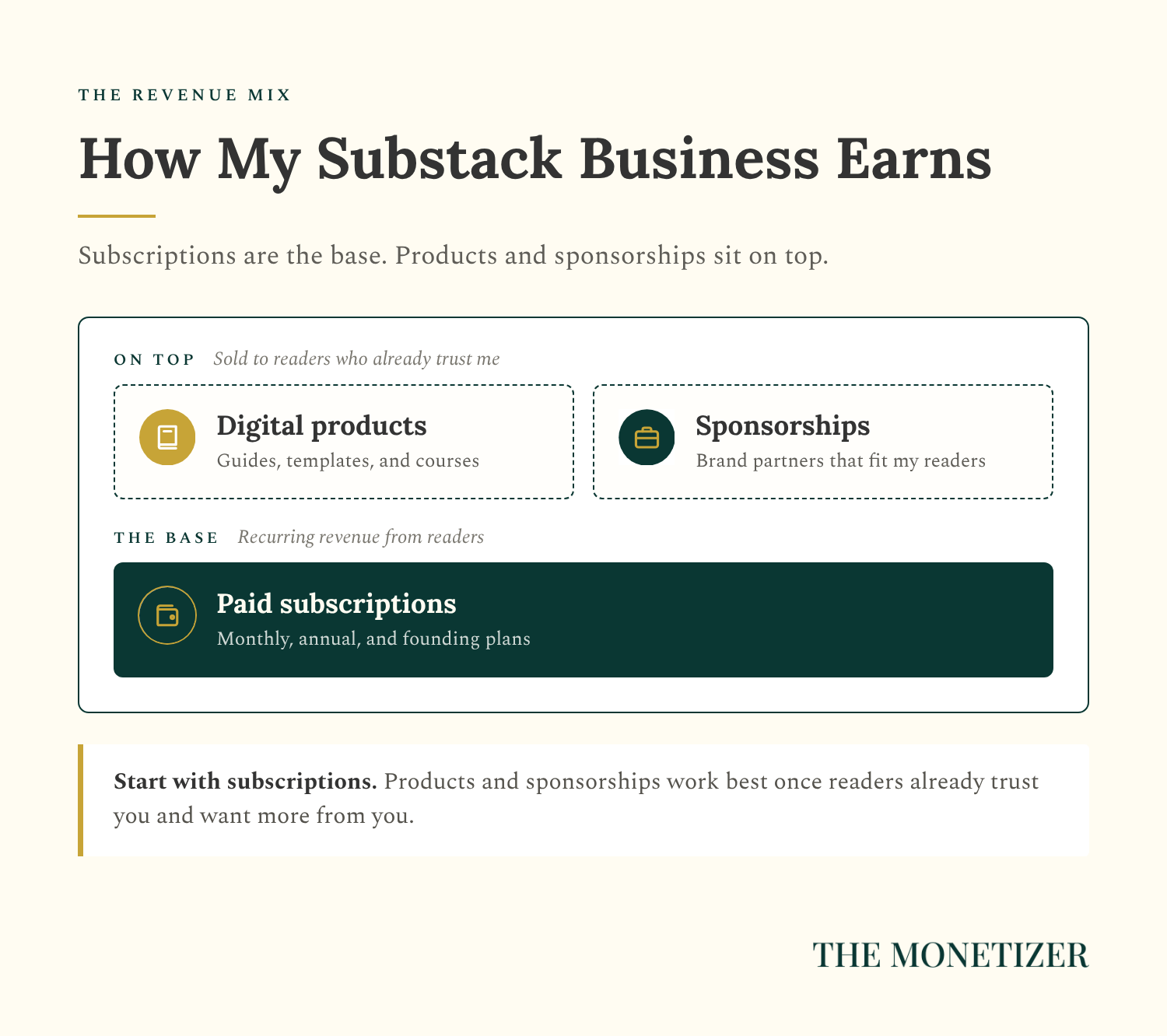
Paid subscriptions anchor that business. Products and sponsorships add revenue, too. I track those separately because one-time sales aren’t recurring subscription income.
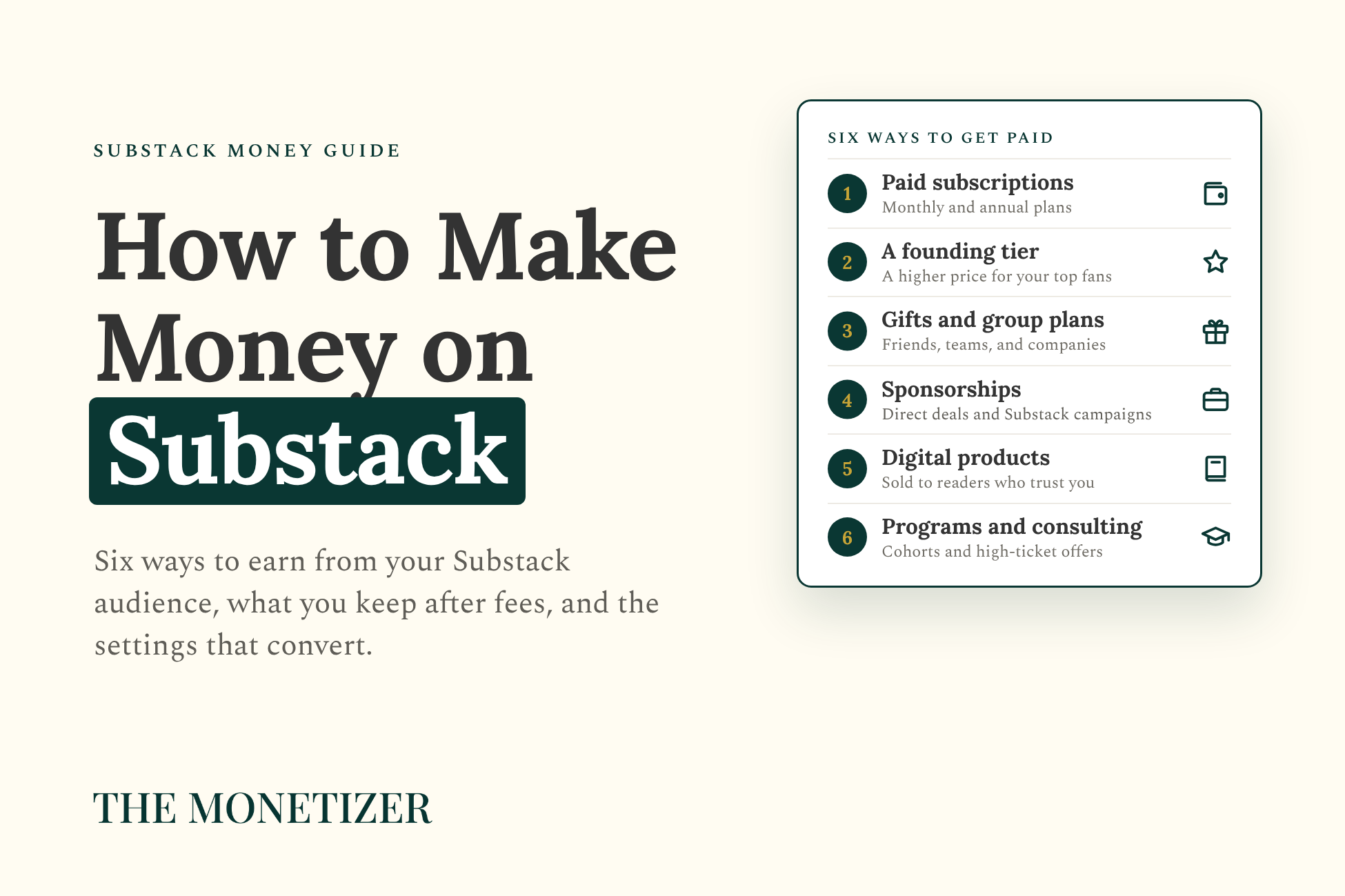
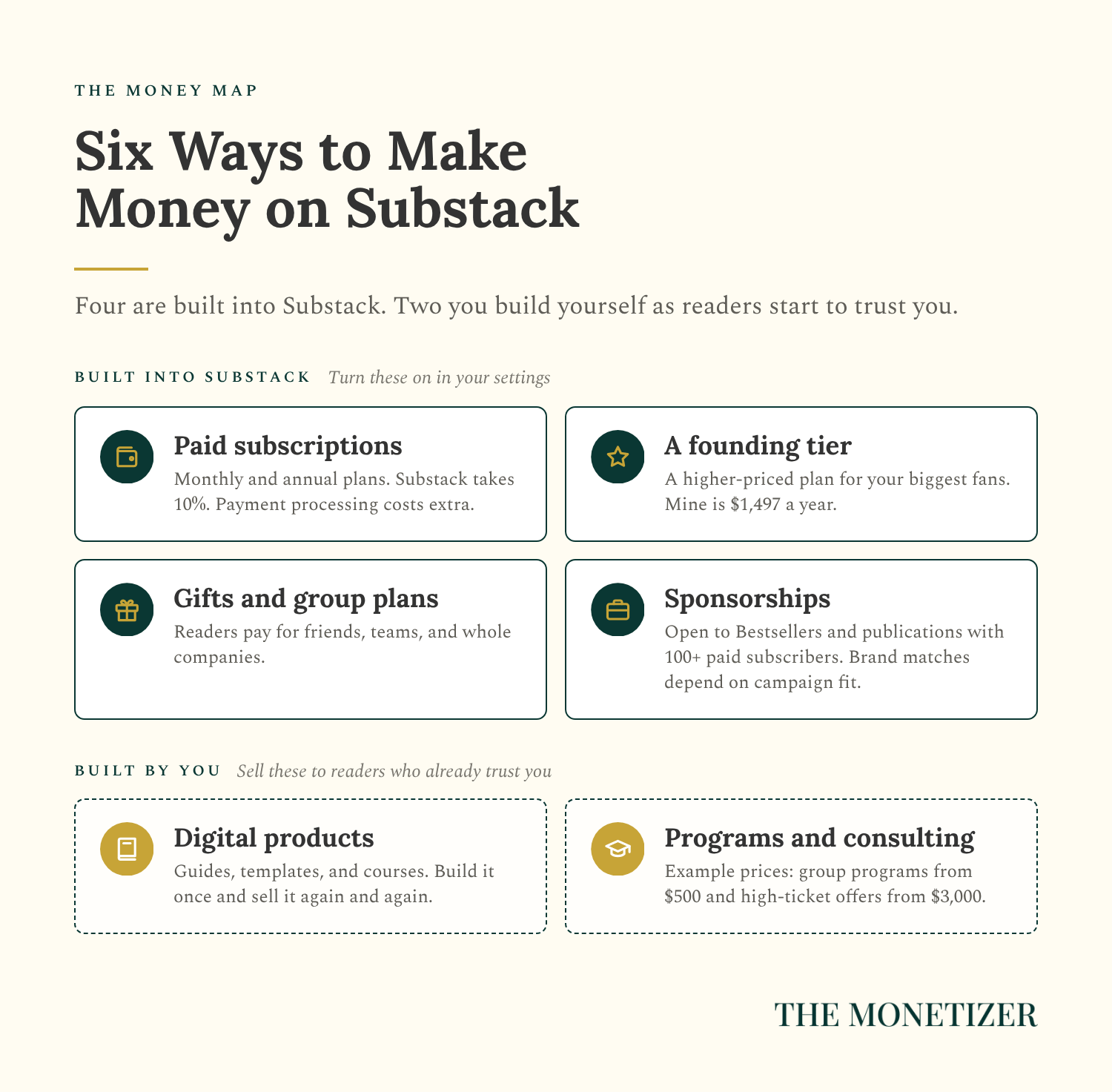
This guide walks through paid subscriptions, founding plans, gifts and groups, sponsorships, products, and programs. I’ll show you the settings, explain the fees, and help you choose what to try first. The screenshots come from The Monetizer and my newest publication. Reading by email? Open the full guide in your browser for every screenshot and the free planner.
By the end, you’ll have:
Paid subscriptions, set up right, with prices and a founding tier that make sense
The real fee math, so you know what you keep from every web and app payment
The settings that convert free readers, from Substack Boost to free trials
Income beyond subscriptions, including Substack’s new sponsorships
Can You Really Make Money on Substack?
Yes. On June 15, 2026, Substack CEO Chris Best said more than 100,000 publishers earned subscription revenue. The top 10 collectively made more than $100 million annually. Those figures show what’s possible, not what a typical beginner earns.
Those headline numbers won’t build your budget. Substack’s going-paid checklist suggests a 3% to 10% conversion range. Treat that as a planning scenario, not a forecast. At those rates, 1,000 free subscribers could become 30 to 100 paid readers. Engagement, your offer, and your price all matter.
The basic model is simple. Publishing is free, and Substack generally keeps 10% of paid subscription revenue. Payment processing costs extra. Optional services can cost money, including a $50 custom-domain setup fee.
Why It’s a Good Time to Start Charging
Substack’s app is also a sales channel. In its October 14, 2026 update, Substack reported nearly 800,000 paid subscriptions through the app during six months. More than half came directly from the Notes feed. Readers can discover your work and upgrade without leaving the app.
The money tools changed this year, too. Substack expanded its sponsorship program in June. Paid publications can offer subscriber perks. Its October 30 update highlighted freewalls, metered paywalls, and annual-upgrade discounts. A new sales-tax system is scheduled for December 1, 2026. I’ll cover its limits below.
I run almost a dozen newsletters, and my growth comes from three habits. I publish useful free articles, post Notes consistently, and treat each publication like a business. If you’re still building that foundation, start with How to Start a Substack.
Before You Start: Two Quick Checks
1. Can You Get Paid Where You Live?
A free publication doesn’t require a payment account. Paid subscriptions require an eligible Stripe account in a supported country. Apple handles billing for subscriptions purchased through its in-app system. Substack currently waives its platform fee for writers in India, Brazil, Indonesia, Mexico, Malaysia, and Thailand. Processing fees still apply. New Stripe applicants in India need an invitation, so check local eligibility before planning your launch.
2. Do You Have Enough Readers to Charge?
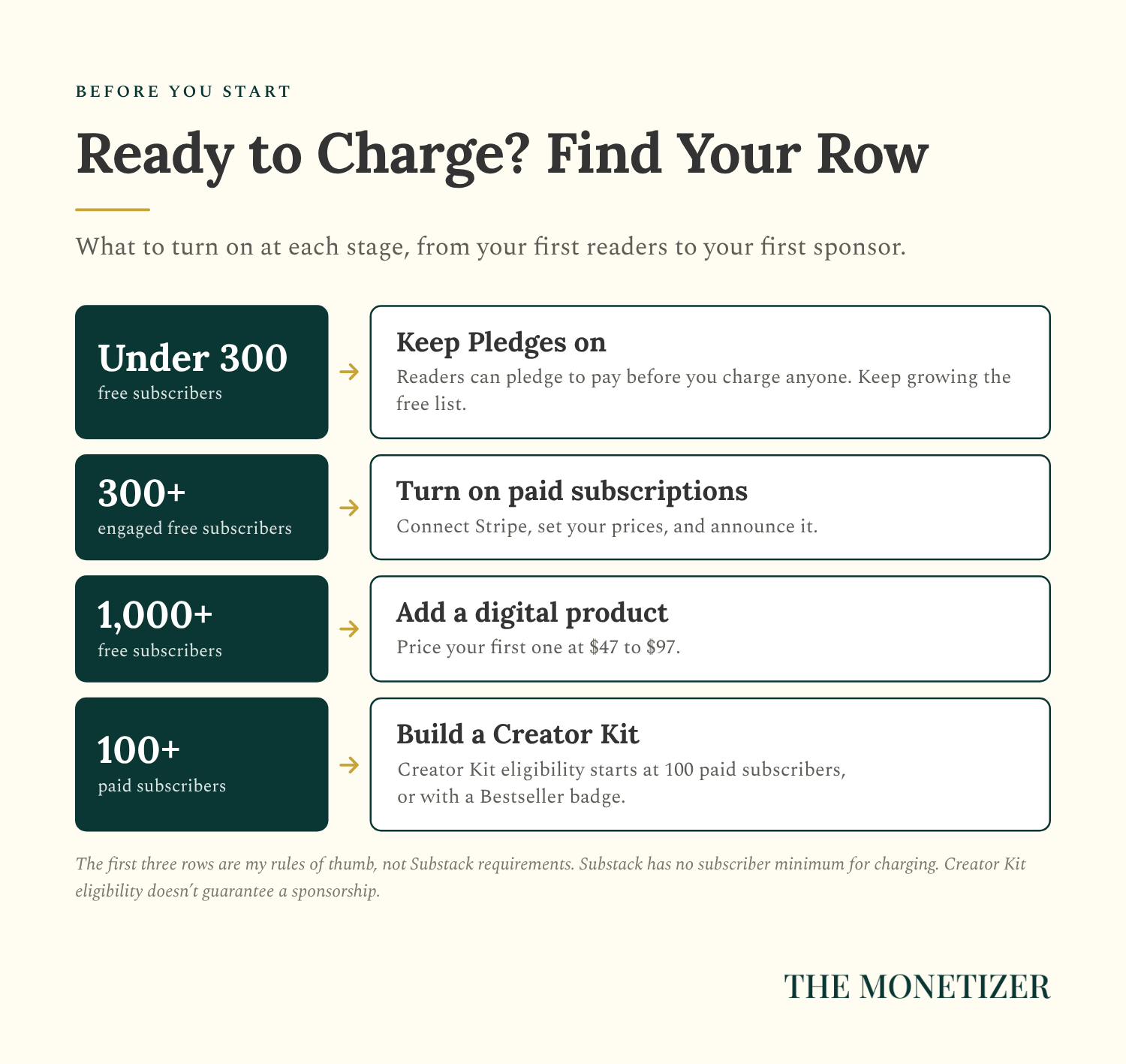
My rule of thumb is to consider charging at 300 to 500 engaged free subscribers. That’s my guideline, not a Substack requirement. A smaller audience with a clear reason to pay can be ready sooner.
You can test willingness to pay before launching. Free publications have Pledges enabled by default. Readers provide card details without an immediate charge. Pledges can convert when you enable payments. If your launch prices exceed earlier pledges, you can honor those rates or ask readers to approve the increase.
Part 1: Turn On Paid Subscriptions
Everything in this part lives in Settings › Payments. On The Monetizer, the same settings also show up under Revenue › Payments in the dashboard sidebar.
Step 1: Connect Stripe
In Settings › Payments, click Connect with Stripe. Have your identity, business, address, and bank details ready. Verification time varies. Substack suggests a virtual mailbox because an address can appear on receipts. Any address you provide must meet Stripe’s requirements.
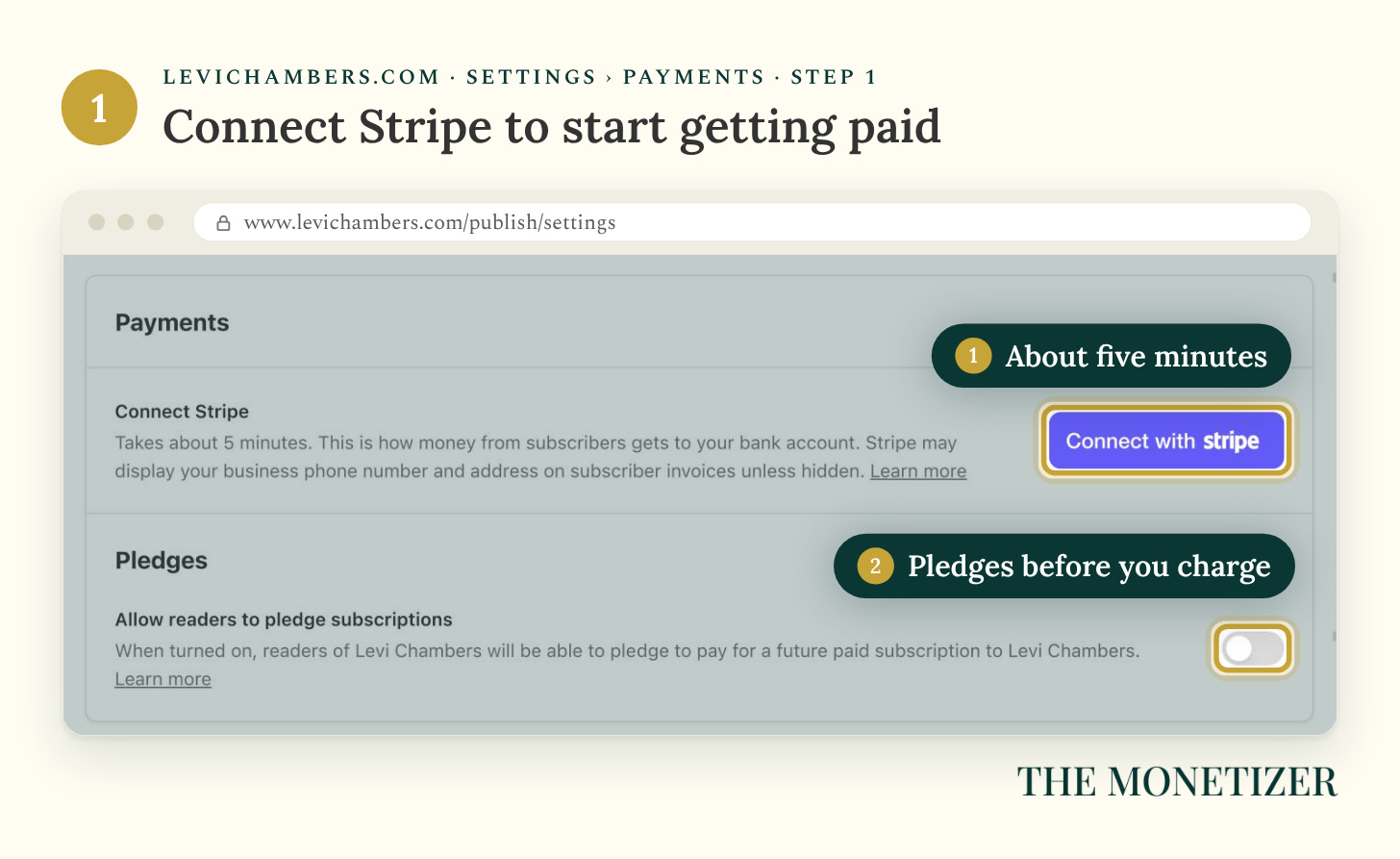
When you come back from Stripe, set your prices (Step 2) and turn on payments. Readers won’t see a paid option until you do. Three more things to know:
Each publication needs its own Stripe account, though payouts can land in the same bank account.
Change prices only in Substack’s settings, never in Stripe, or you risk breaking checkout.
The first Stripe payout typically takes 7 to 14 days. Later deposits depend on your country, payout schedule, and bank. Check the estimated deposit date in Stripe.
Step 2: Set Your Monthly and Annual Prices
Every standard paid publication offers monthly and annual plans; Substack has no annual-only option. For US-dollar accounts, the minimum prices are $5 monthly and $30 annually.
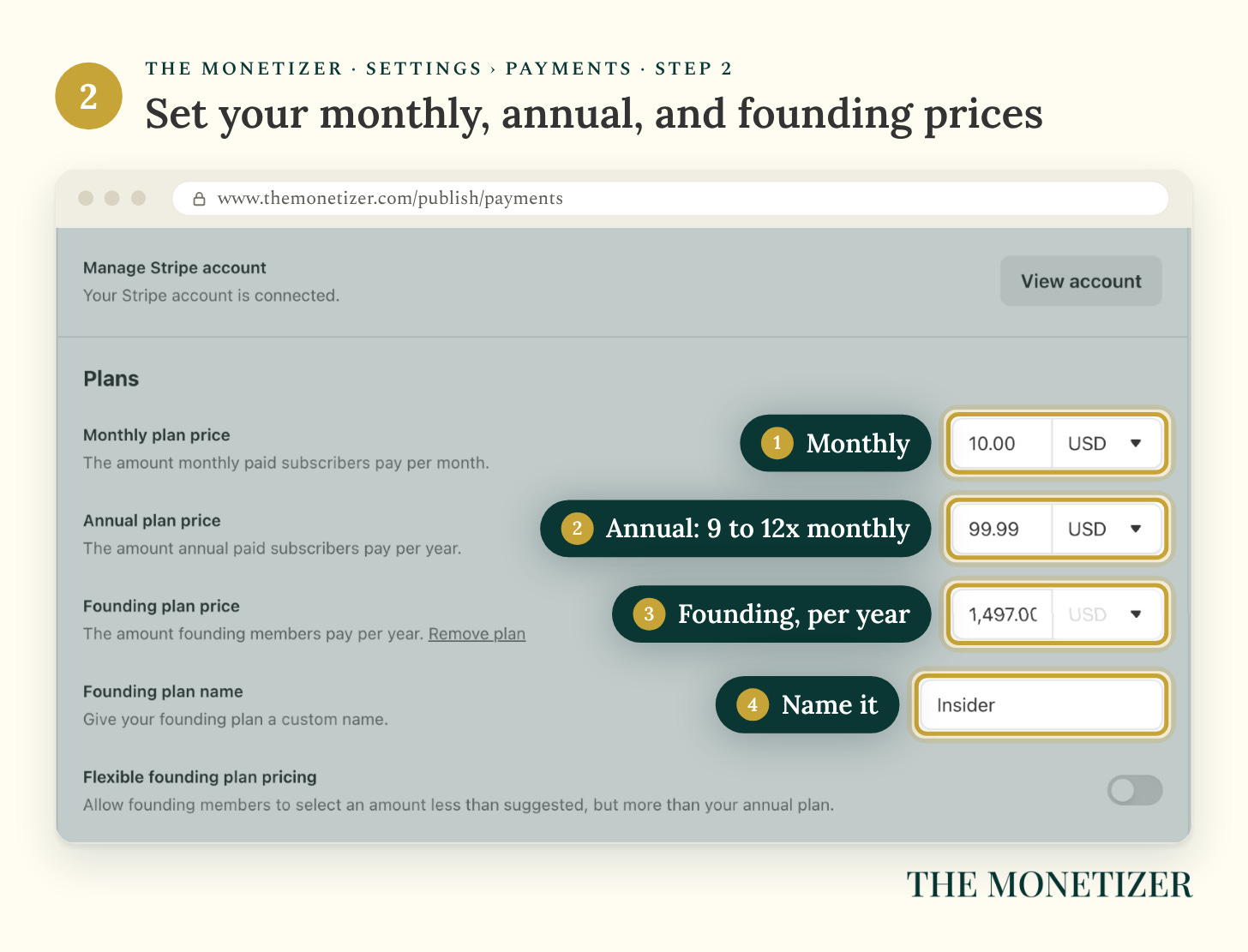
Substack’s checklist gives $5 monthly, $50 annually, and $250 for founding members as an example. Those aren’t required prices. The Monetizer’s settings shown here are $10 monthly and $99.99 annually. Compare similar publications, then price the specific value you deliver.
Your annual price affects both revenue and eligibility for automated upgrade offers. My dashboard says those emails require annual pricing between nine and twelve times the monthly price. At $10 monthly, that means $90 to $120 annually. Annual payments also bring cash forward. A $100 annual payment beats four $10 payments before cancellation, but discounts reduce revenue per month.
One more detail: changing your listed price normally affects new subscribers. Existing subscribers keep their rate by default. Contact Substack’s support team if you want to change existing subscriptions.
Step 3: Add a Founding Tier
The founding tier is an optional third plan for readers who want to pay more. Its price has to be higher than your annual price, and you can give it its own name. Mine is called Insider.
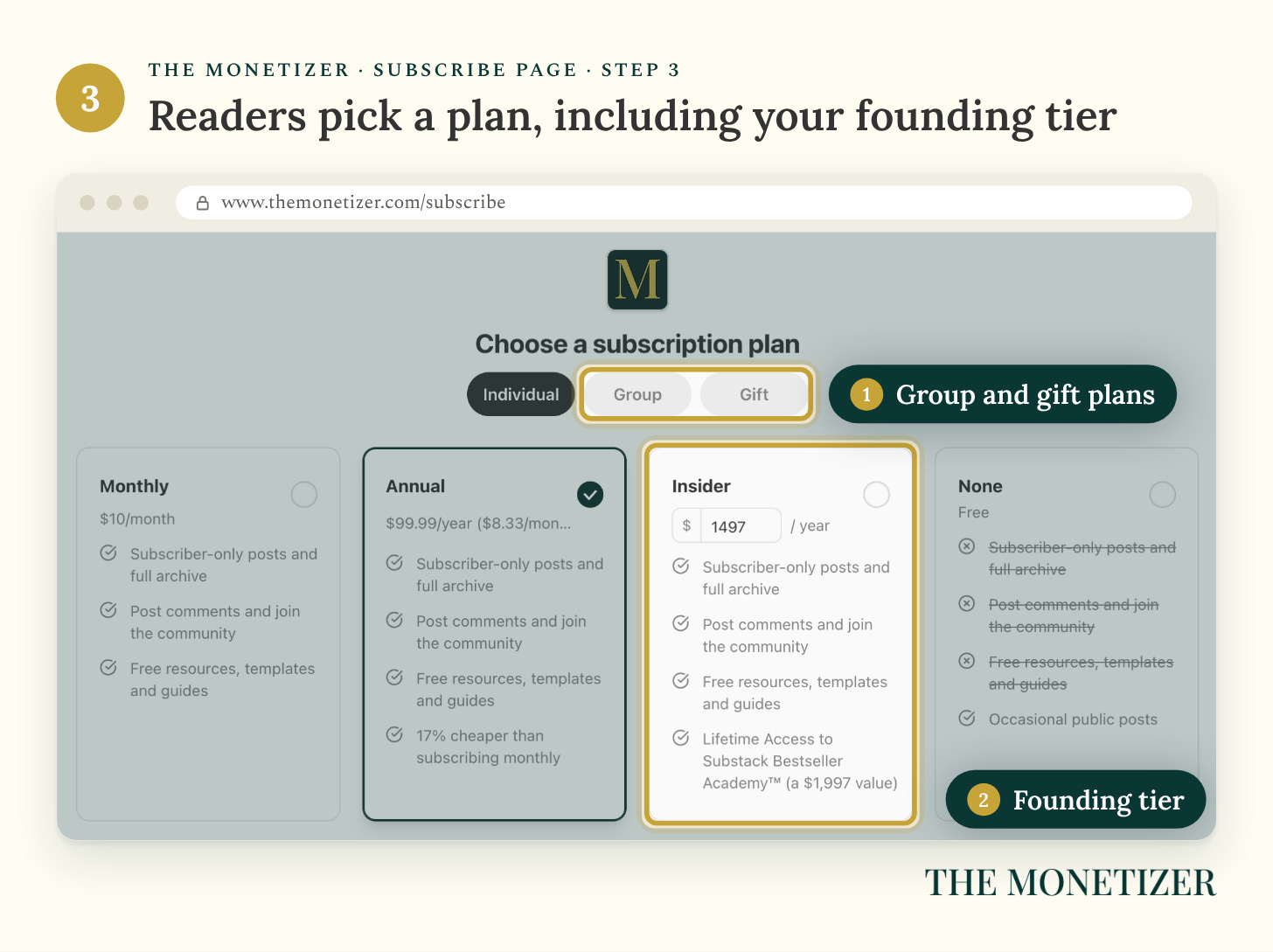
The Insider tier shown here costs $1,497 annually and includes lifetime access to Substack Bestseller Academy. The subscription renews annually; the course access is lifetime. Your founding tier can offer an extra benefit or simply let readers support your work more generously.
Two settings matter here. Flexible founding plan pricing lets readers choose an amount above your annual price, up to your founding price. Removing the tier stops new purchases, but existing founding subscriptions continue renewing. Apple’s in-app checkout doesn’t support founding plans, so direct those readers to the web.
Step 4: Write the Benefits Readers See
Your benefits become the check marks under each plan on your subscribe page. You write them in Settings › Payments › Benefits, with separate lines for free, paid, and founding readers.
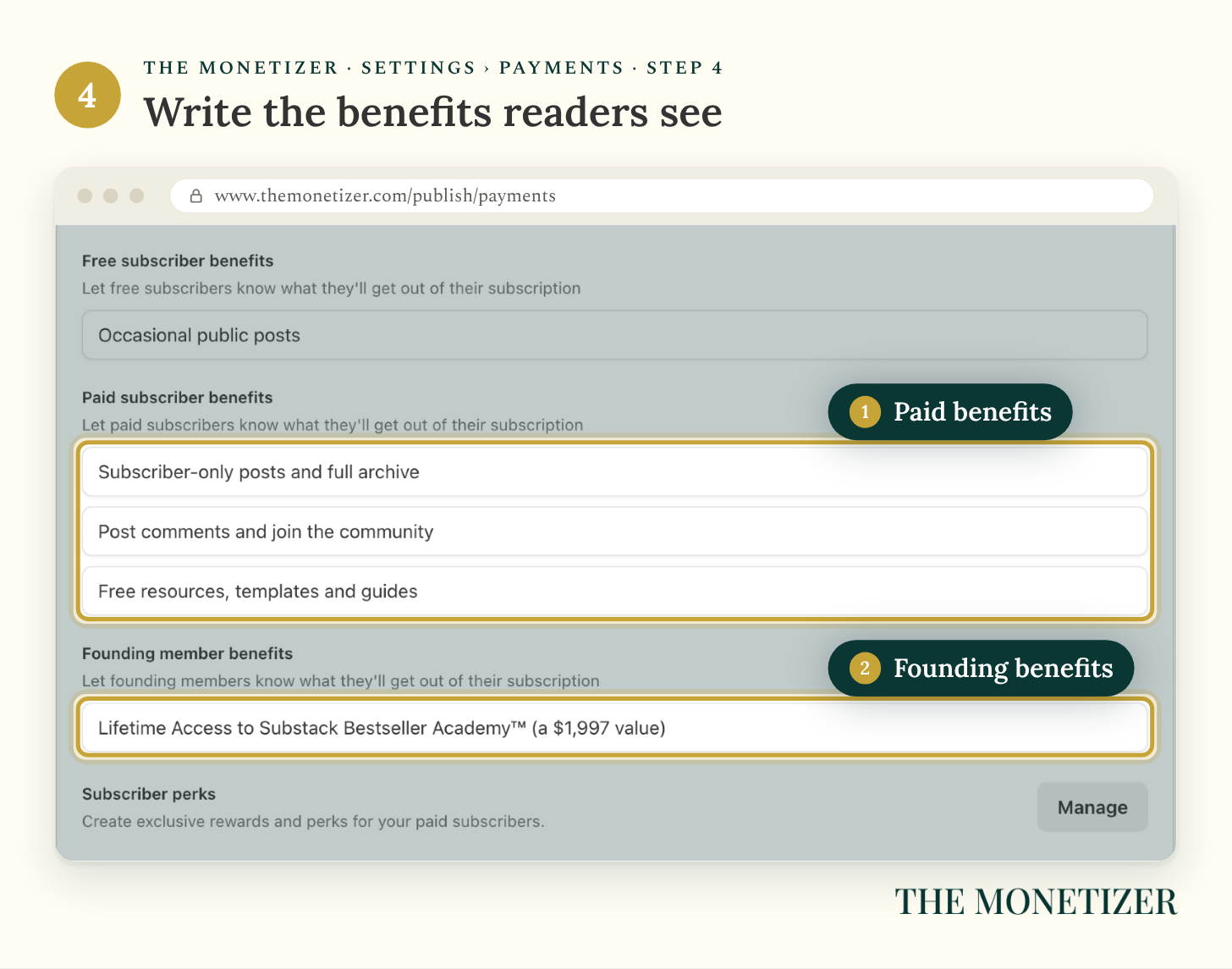
Name what paid readers actually get. “Subscriber-only posts and full archive” tells a reader exactly what’s behind the wall. “Exclusive content” tells them nothing.
Step 5: Decide What Goes Behind the Paywall
You choose your audience post by post. My starting guideline is 70% to 80% free content. Adjust that mix to your offer and workload. Free articles help new readers find me through search, the app, and social.
The Paywalling section in Settings › Payments decides the rest:
Auto-paywall older posts moves your archive behind the paywall after a set time. On The Monetizer, posts go paid after 12 months.
Auto-paywall paid posts controls the preview length, from no preview to a longer excerpt.
Metering lets free subscribers read a set number of paid posts each month.
Custom paywall for churned subscribers shows a special resubscribe prompt to people who canceled.
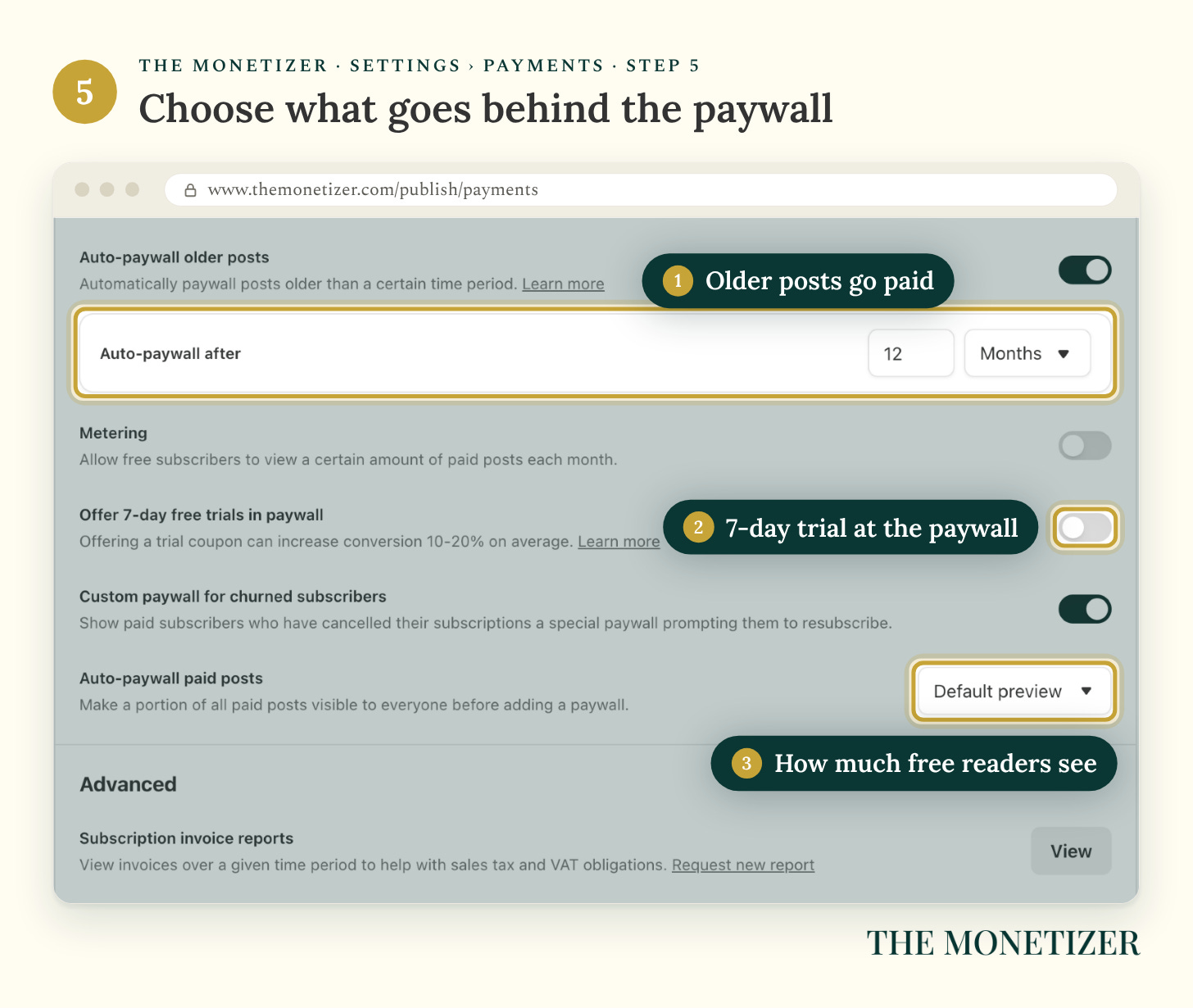
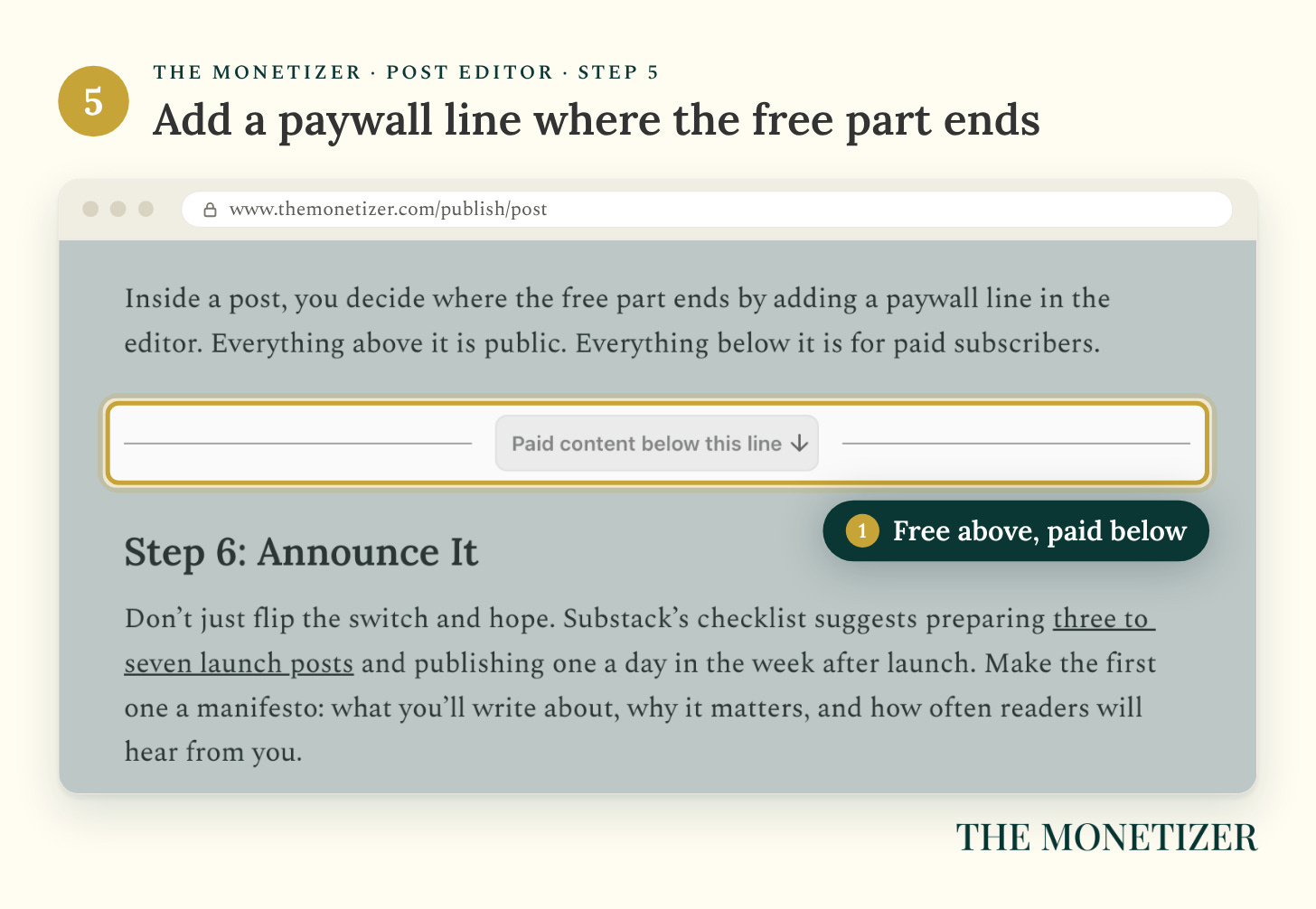
Inside a post, the Audience setting controls access. For a paid post, a paywall line marks where the public preview ends. A freewall instead asks readers to subscribe without paying. Choose Free or paid subscribers for that option. That’s how the free planner at the end of this guide works.
Step 6: Announce It
Don’t just flip the switch and hope. Substack’s checklist suggests preparing three to seven launch posts, then publishing daily during launch week. Adapt that schedule to what you can sustain. Explain what readers get, why it matters, and how often you’ll deliver.
Then ask your free subscribers directly. Send a teaser, unlock a paid post, or offer a limited-time discount. Update your paid and founding welcome emails in Settings › Emails before launch.
Part 2: What You Keep After Fees
Substack generally takes 10% of paid subscription revenue. For a US Stripe account and US card, processing costs 2.9% plus 30 cents per payment. Stripe also charges 0.7% for recurring billing. These are publisher fees. Readers pay your web price plus applicable tax.
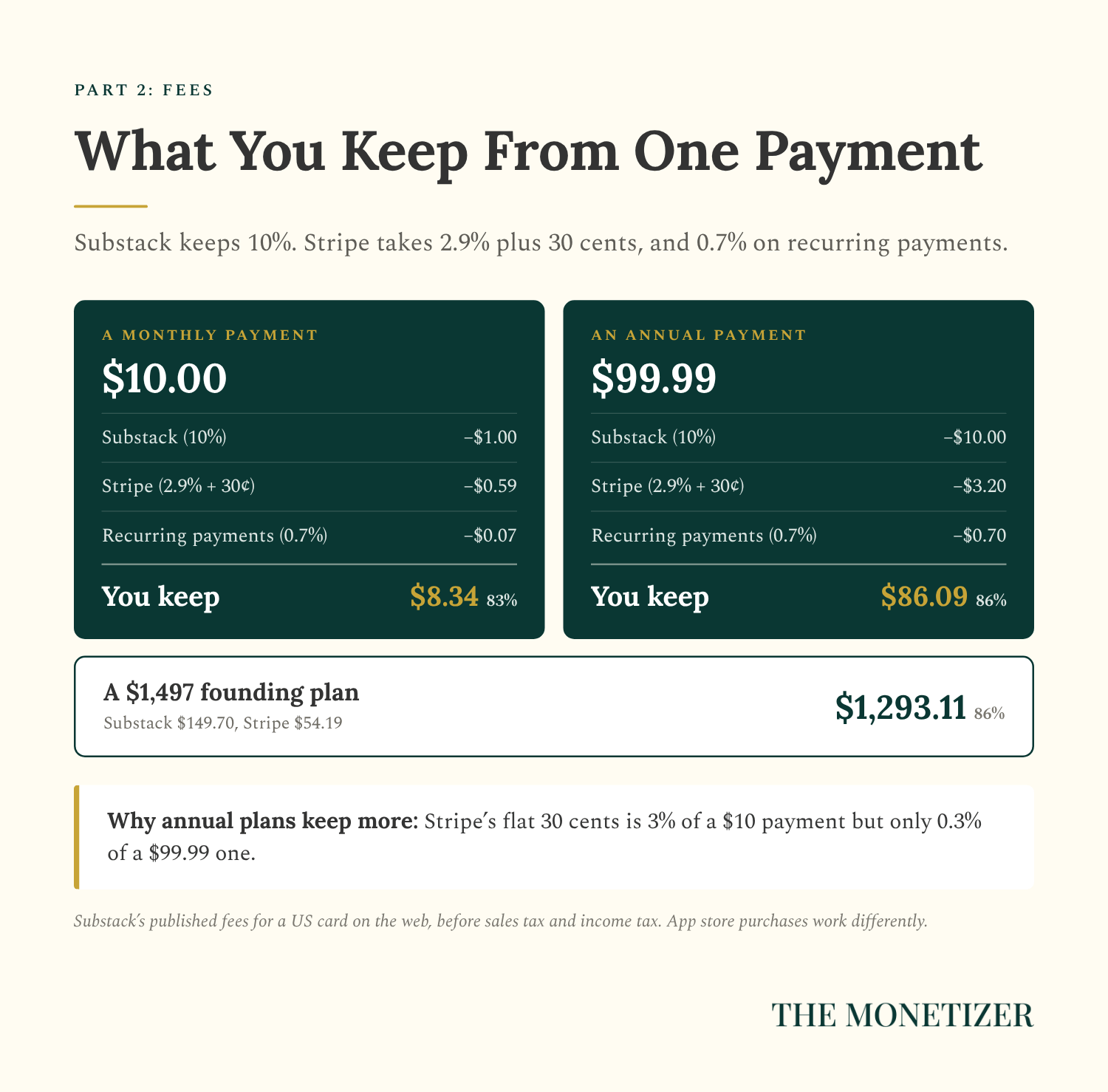
On a $10 monthly payment, Substack takes $1 and Stripe’s listed fees total 66 cents. That leaves $8.34. A $99.99 annual payment leaves about $86.09. These estimates exclude tax, refunds, disputes, currency conversion, and other business expenses. Local payment methods can carry different fees.
App Purchases: Apple and Google
Readers upgrading in the app can face different pricing and fees. Apple’s in-app checkout turns on automatically for eligible paid publications and cannot be disabled while payments remain connected. Apple takes 30% during the first year, then 15% after a year of continuous paid service.
You choose how to handle it in Settings › Payments › Billing › In-app pricing options:
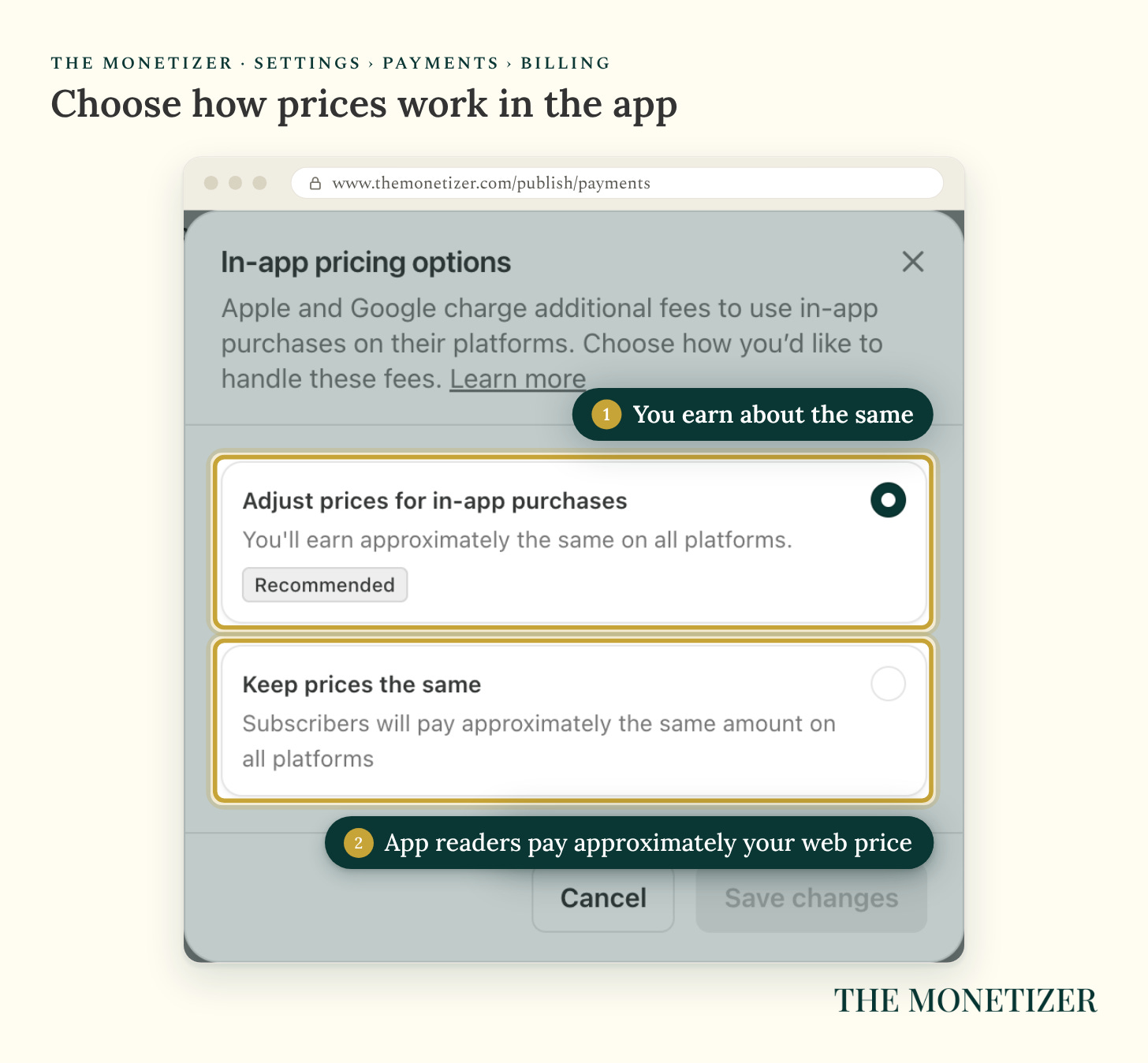
Adjust prices raises the in-app charge to help preserve your web earnings. Keep prices the same leaves you with less per subscription. Apple may round prices to a supported App Store amount. Substack calculates its 10% using your original web price. US iPhone readers can also follow a link to ordinary web checkout.
Android works differently where this checkout is supported. Readers finish a Substack checkout in their browser, but Google takes 10% of the payment. Substack’s example adjusts a $10 plan to $11, leaving $8.90 before Stripe fees. Keeping the price at $10 leaves $8 before Stripe fees.
Timing changes, too. Apple pays Substack monthly, up to 45 days after month-end. Substack then sends earnings to your bank or Stripe, depending on your country. Some direct-bank payouts stay held until the balance reaches $100. Founding plans and discount links should use web checkout.
Sales Tax Starts December 1
Starting December 1, 2026, Substack says it will manage applicable sales tax and VAT for eligible paid publications. It will calculate, collect, and remit that tax without an additional charge. The change is automatic for eligible accounts. Publishers in Brazil, Thailand, Malaysia, India, Mexico, Hong Kong, and Singapore remain excluded for now. So do publishers in the UAE, Romania, Hungary, and Czechia.
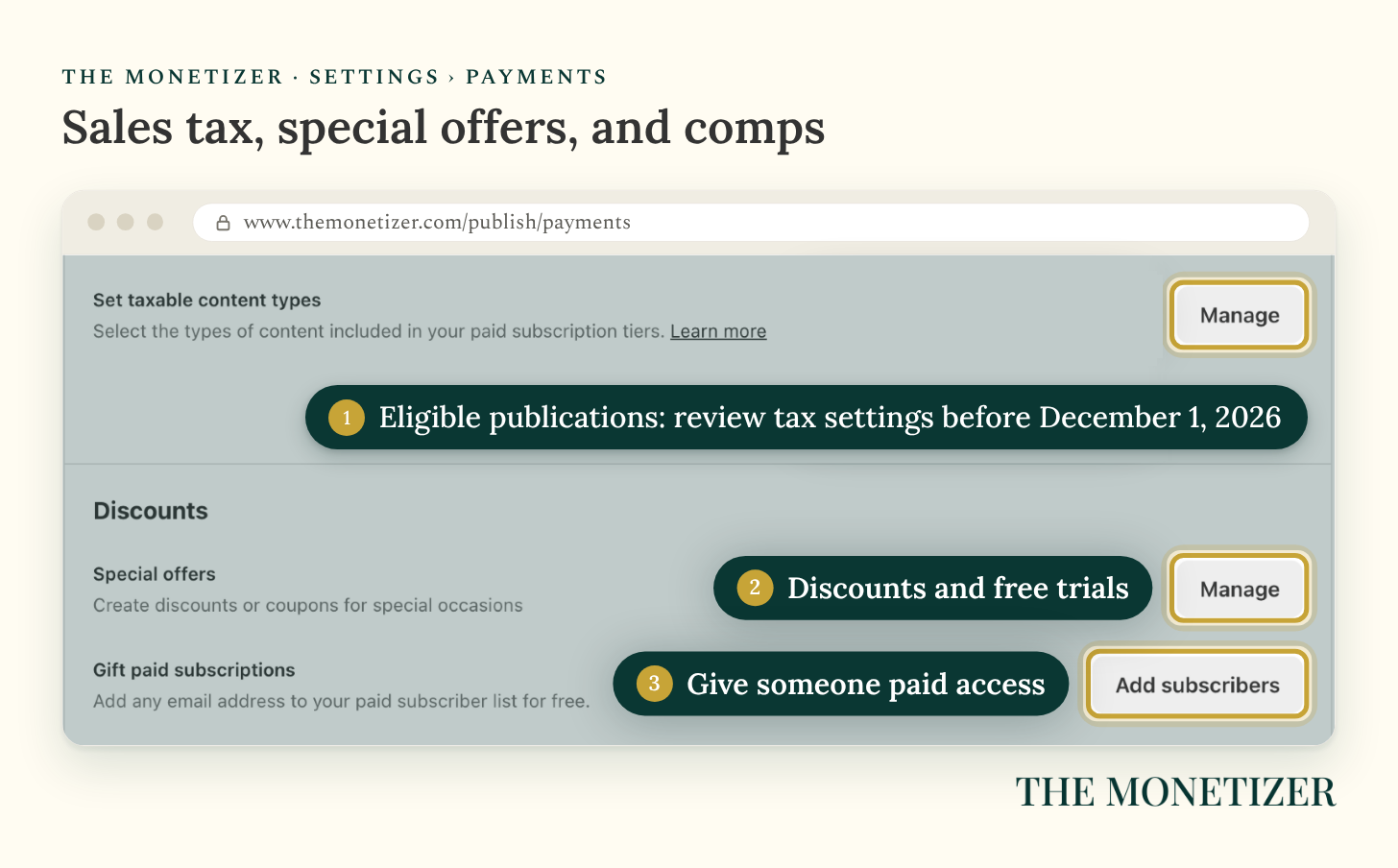
Before then, review your taxable content types and pricing in Payments. For US and Canadian publishers, applicable tax gets added at checkout. Eligible publishers elsewhere can choose tax-inclusive pricing, which reduces the proceeds from the advertised price. Obligations for earlier payments remain unchanged. Income tax on your earnings is separate; confirm your situation with your accountant.
Part 3: Turn More Free Readers Into Paid Ones
Getting paid subscribers takes more than publishing. Review the conversion tools in Settings › Growth and Settings › Payments. Choose offers that fit what you’re selling.
Step 7: Turn On Substack Boost
Once payments are on, review Boost in Settings › Growth. These tools automate selected trials, discounts, and gift offers. Check which options are enabled and whether their offers suit your business. Defaults and availability can change.
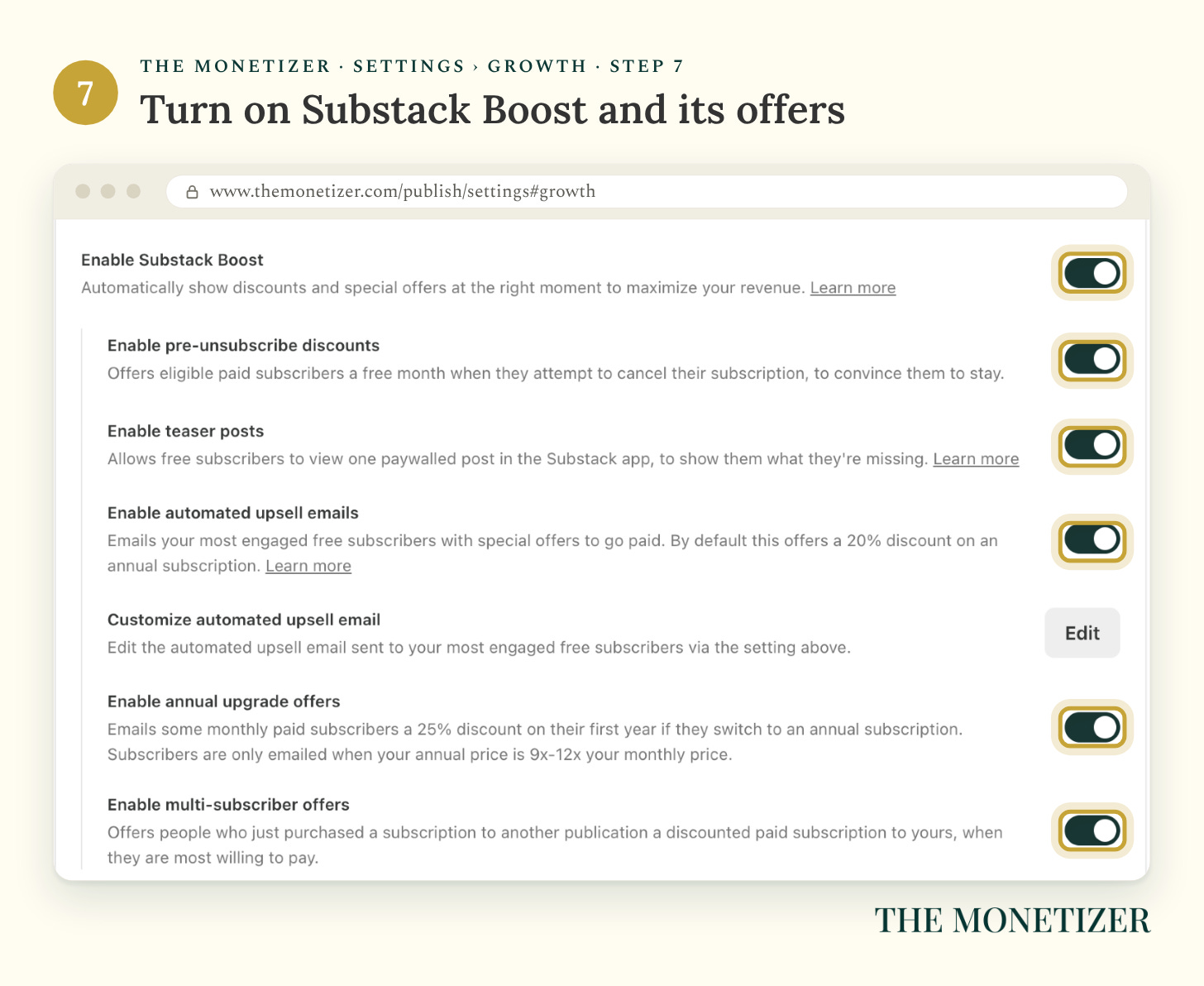
Under Boost, my dashboard shows these five options:
Pre-unsubscribe discounts offer eligible paid subscribers a free month when they try to cancel.
Teaser posts help eligible free subscribers unlock a paid post by installing the app. Eligibility includes not having previously unlocked a teaser.
Automated upsell emails invite engaged free subscribers to upgrade. My dashboard shows a default 20% annual discount. Review or customize the email and offer before relying on it.
Annual upgrade offers invite eligible monthly subscribers to switch, with 25% off their first year in my dashboard. That dashboard requires annual pricing between nine and twelve times the monthly price.
Multi-subscriber offers show a discounted subscription to people who just paid for another publication.
Step 8: Run a Special Offer
Special offers are discount and trial links you create yourself. In Settings › Payments, find Special offers, click Manage, then New offer.
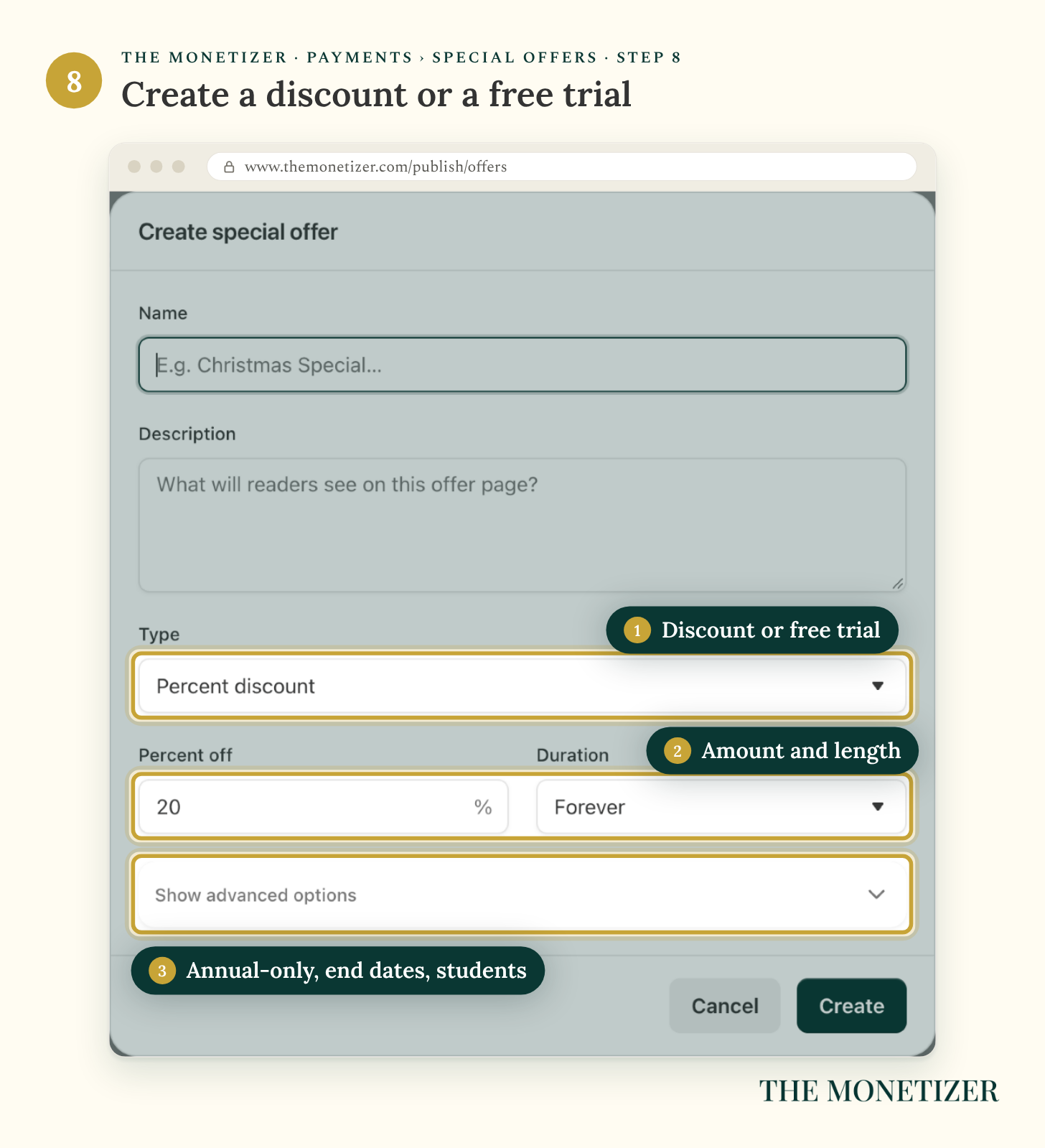
You can create a percentage discount or a free trial, then choose from the durations offered in your dashboard. Trials require a card and charge automatically afterward unless canceled. Advanced settings can restrict eligibility, set an expiration date, or limit an offer to annual subscriptions. Discounts apply to monthly and annual plans, not founding plans. For a manual monthly-to-annual upgrade offer, check the option that makes it available to paid subscribers.
How big should the discount be? Substack reports strong results from 20% discounts. I’d start with one clear offer, then compare paid conversions and revenue with your usual results.
Step 9: Add a Free Trial to Your Paywall
One switch adds a trial to eligible paywalls: Offer 7-day free trials in paywall, under Payments › Paywalling. My dashboard says trials can increase conversion by 10% to 20% on average. That’s Substack’s estimate, not a guaranteed result. Trials charge afterward unless canceled. Trial readers can appear in the paid count but don’t contribute to gross annualized revenue until payment begins.
Step 10: Use Gifts and Group Plans
Gifts and groups serve different purposes. A reader can buy someone a gift subscription through the Gift tab. That purchase generates revenue. Free referral gifts and complimentary access work differently, so don’t count them as sales.
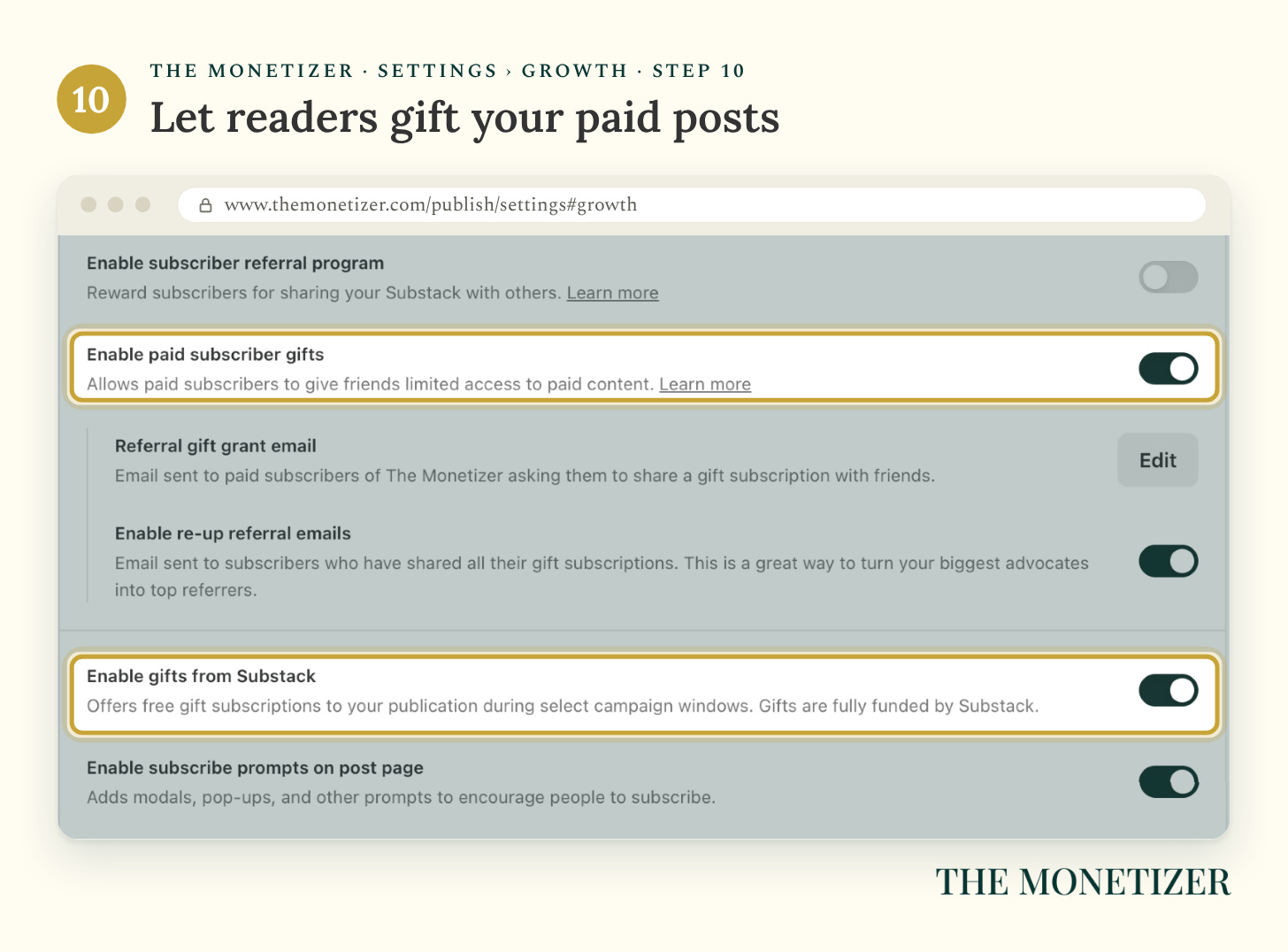
Paid subscriber gifts give friends limited free access. Gifts from Substack are separate campaigns funded by Substack for eligible publications and readers. Substack deducts its 10% fee from those reimbursements. Availability is limited.
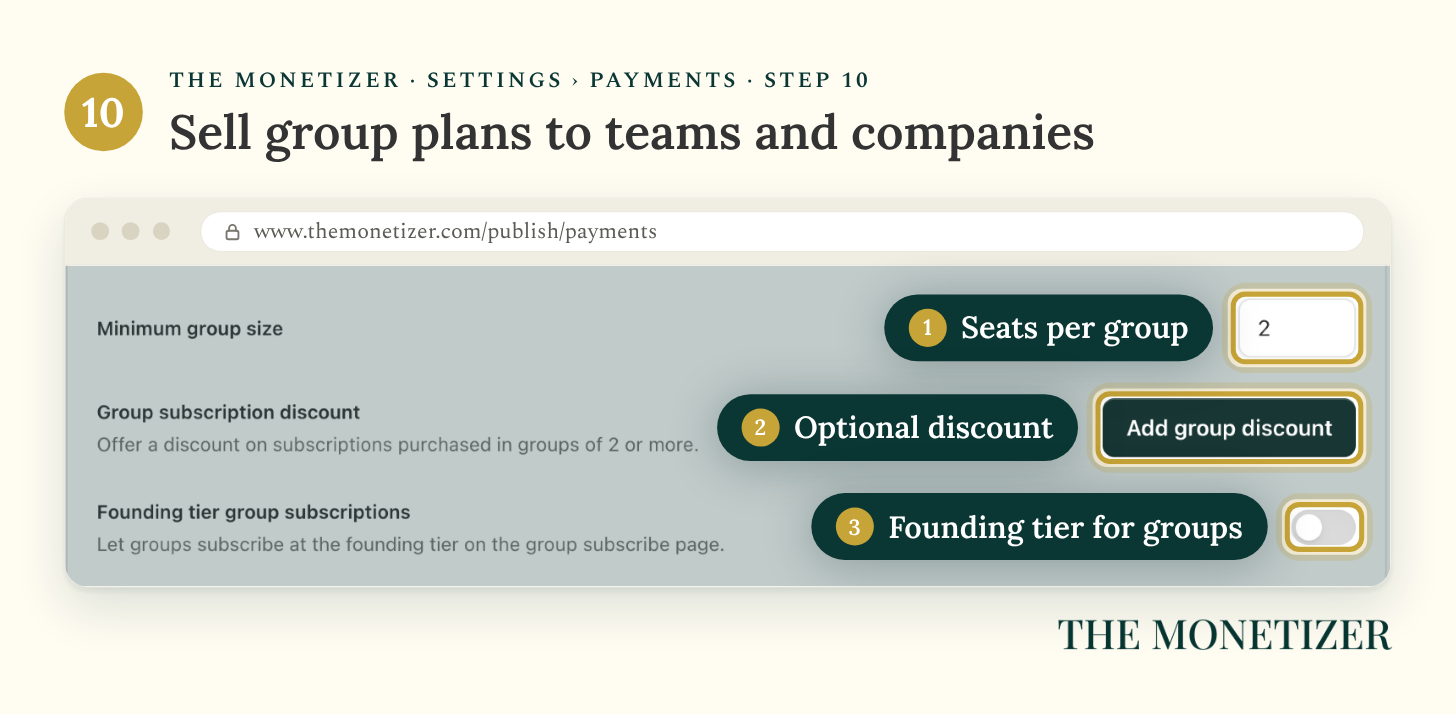
Group subscriptions let teams buy multiple annual subscriptions. Set a minimum group size and choose whether to offer a discount. Gift paid subscriptions in your dashboard grants complimentary access, without collecting payment. Comps and free trials don’t count toward Bestseller badges.
Part 4: Make Money Beyond Subscriptions
Recurring subscriptions are one part of the business. Products, services, and sponsorships can add revenue beyond subscription payments. Track them separately, and don’t count an annual upgrade twice.
Sponsorships Through Substack
Substack’s sponsorship program can connect participating writers with brands. Creator Kits are available to Bestsellers and publications with at least 100 paid subscribers. Look for Sponsorships under Revenue. Eligibility lets you express interest; it doesn’t guarantee a campaign.
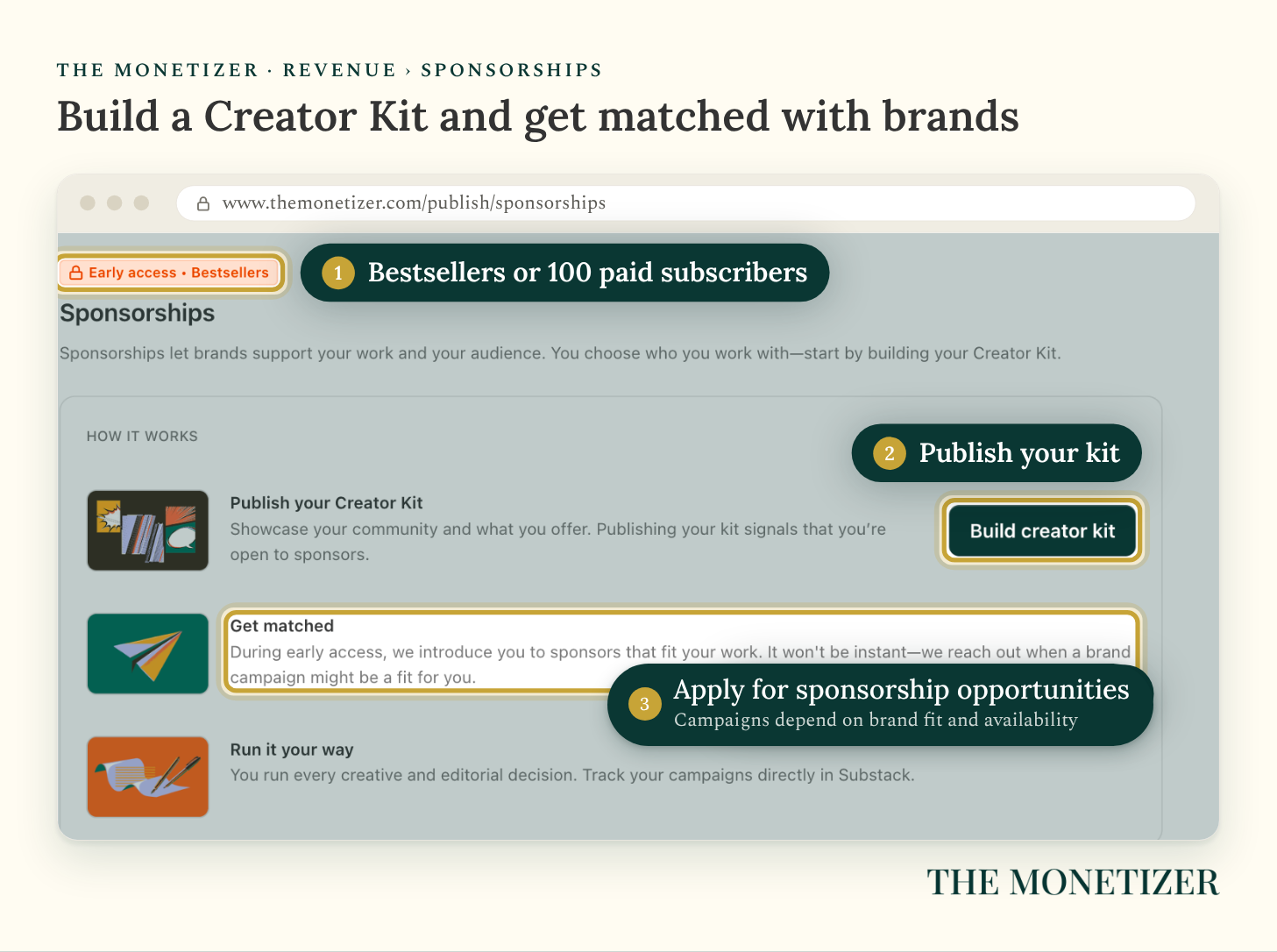
You build your kit, describe your audience and formats, and set a minimum spend. Substack may contact you when a campaign fits. Its June announcement named partners including T-Mobile, Uber, and Balenciaga. In October, it announced sponsored upgrades, unlocked posts, and themed collections, initially tested with smaller groups. Confirm the platform’s fee, your payout, deliverables, and payment terms before accepting a campaign.
You can also sell sponsorships directly. Start with a brand that fits your readers, then pitch a specific placement and audience. Agree on the scope and payment terms in writing. Clearly label paid placements so readers understand the relationship.
Your Own Products and Programs
Digital products give readers something useful they can buy separately: a template, guide, workshop, or course. You can sell them through your audience using an external checkout. That checkout has its own fees and terms.
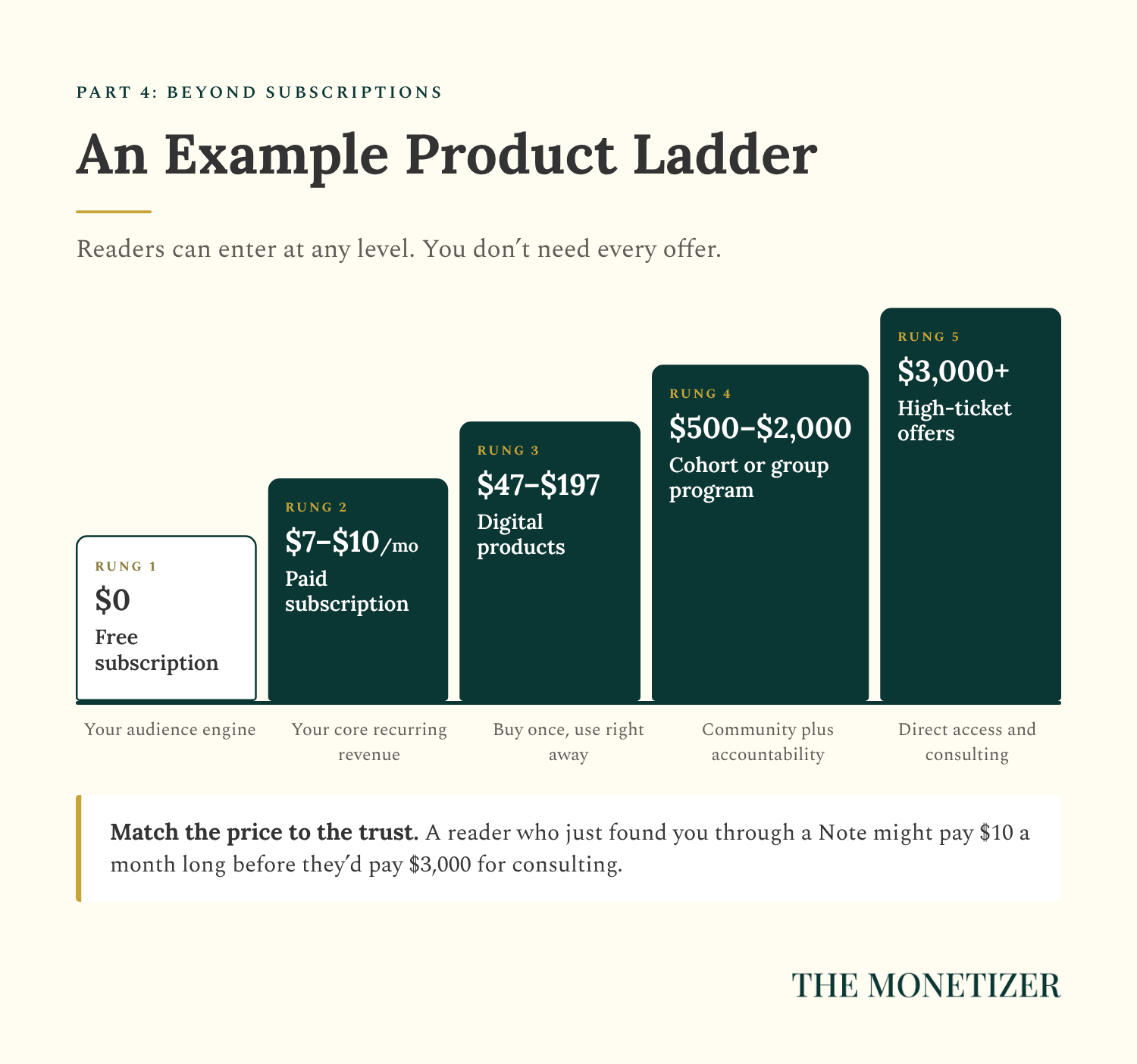
Someone who finds you through a Note might subscribe free, then buy a template or join a workshop. They don’t have to buy every step. My starting guideline is to consider a product around 1,000 free subscribers, priced from $47 to $97. Demand matters more than that milestone. A founding tier can also include a product, as my Insider offer does with Substack Bestseller Academy.
How Much Money Can You Make on Substack?
Here’s what different paid-subscriber counts produce at $10 monthly. The free-list estimates use Substack’s 3% to 10% planning range. They are scenarios, not targets you’re guaranteed to reach.
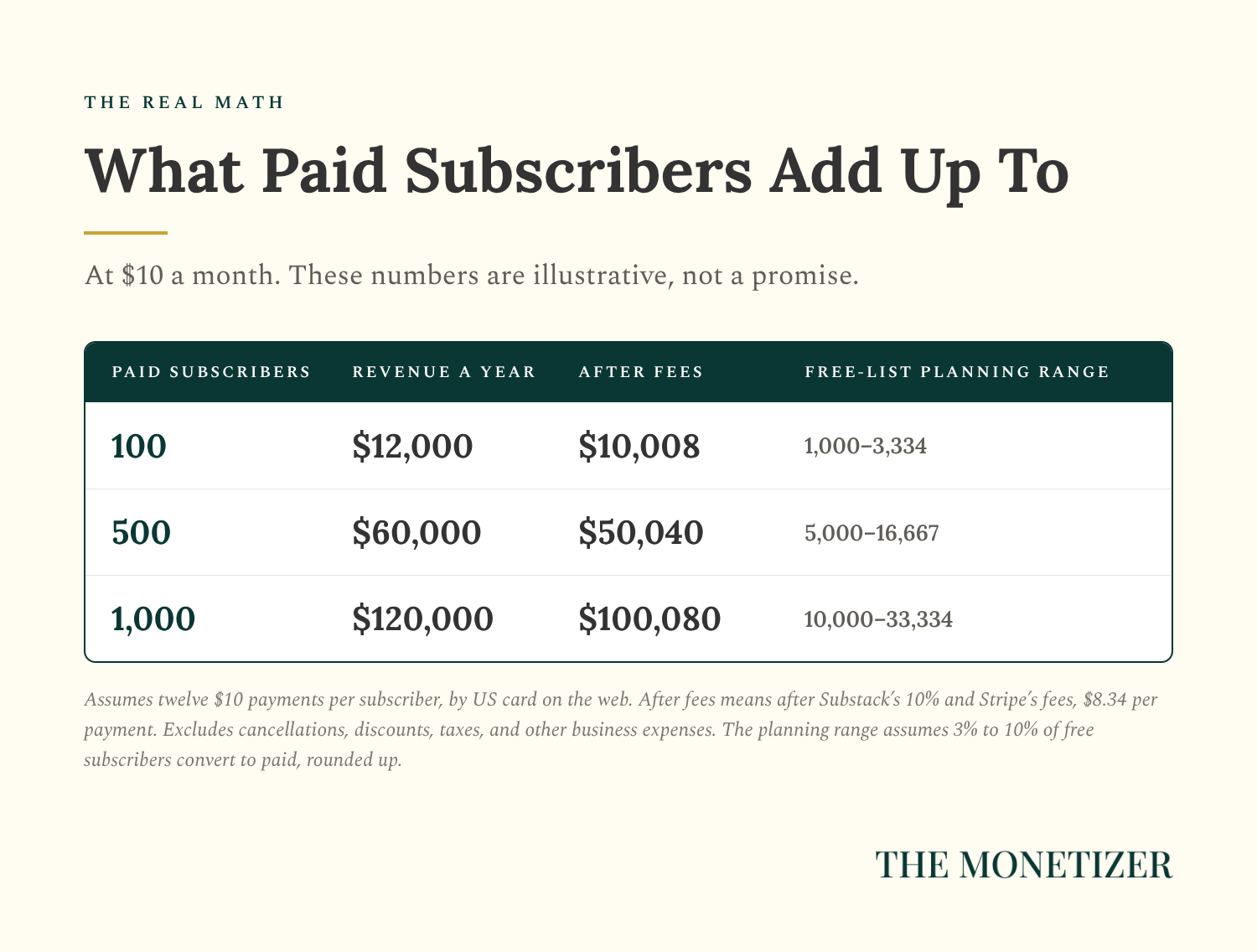
The math assumes every subscriber makes twelve $10 payments by US card through a US Stripe account. Actual results vary with cancellations, discounts, annual plans, refunds, and checkout methods. The after-fee column still excludes taxes and business expenses. Revenue isn’t profit.
It also takes time. My newsletters took two and a half years to support six salaries. Start with a schedule you can sustain, then add offers as you learn what readers want.
Track Your Revenue
Your dashboard’s Overview shows gross annualized revenue, paid subscribers, and total subscribers. Gross annualized revenue projects a yearly amount from current paid subscriptions, before fees. It isn’t cash already collected or a promise of next year’s earnings. Separate trial subscribers from paying customers when assessing performance.
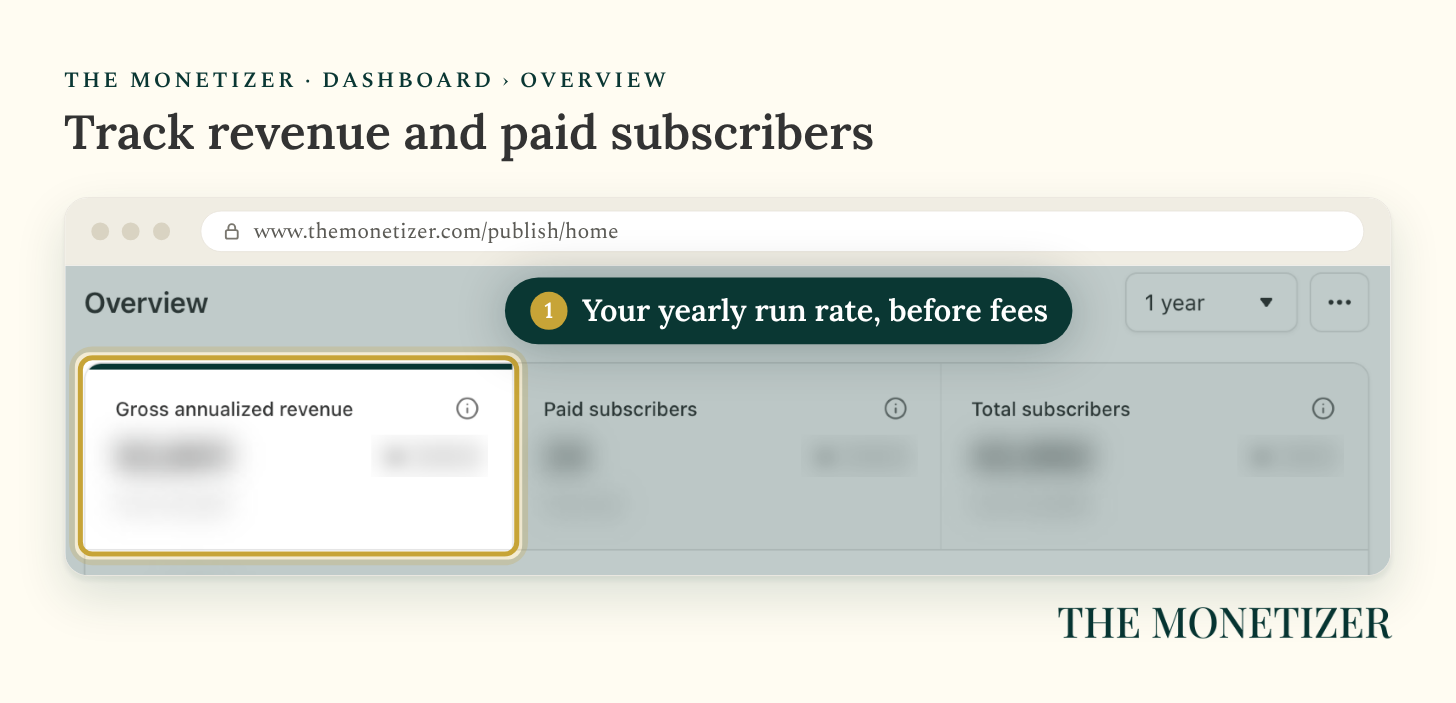
Check those numbers regularly, then review cancellations, actual payouts, and which posts attract paying readers. Gross growth means less if too many subscribers leave. My guide to Substack Notes explains how to review individual Notes, too.
Four Mistakes That Cost You Money
Vague benefits. “Exclusive content” doesn’t sell, so name what paid readers get.
An annual price outside 9 to 12 times your monthly price, which stops your annual upgrade emails.
Changing prices in Stripe instead of in Substack’s settings.
Keeping in-app prices the same without realizing Apple’s cut comes out of your share.
FAQ
Can You Make Money on Substack?
Yes. Substack reports more than 100,000 publishers earning subscription revenue. Your results depend on the audience you reach, the value you offer, and whether readers stay. There’s no guaranteed income.
How Much Money Can You Make on Substack?
It depends on your price, subscriber count, retention, and costs. At $10 monthly, 100 subscribers paying for twelve months generate $12,000 before fees and taxes. That example assumes no cancellations, discounts, or refunds.
How Does Substack Make Money?
Substack generally keeps 10% of paid subscription revenue. Stripe’s processing and recurring-billing fees are separate. Optional services and other commercial programs can have different charges.
How Do Substack Writers Get Paid?
Through Stripe for web subscriptions, with deposit timing determined by your account, country, and bank. Apple purchases follow a separate monthly payout process and may involve a minimum payout balance. Check the Earnings tab for your actual deposits.
How Many Subscribers Do You Need to Make Money on Substack?
There’s no minimum subscriber count to charge. I usually suggest starting around 300 to 500 engaged free readers. A smaller, highly interested audience can be ready sooner. Pledges can help you test demand.
Does Substack Take a Cut of Sponsorships?
Substack’s campaign terms determine your payout. Ask what fees apply before accepting a native sponsorship. For a directly sold sponsorship, agree on pricing and payment terms with the brand.
Where to Go From Here
Paid subscriptions can support a business on their own. Add products, programs, or sponsors when they solve a real need for your readers. You don’t need to launch everything at once.
That’s what I teach in Substack Bestseller Academy: building an audience, creating an offer, and selling it clearly. Start with the planner below if you want to put this guide into practice. Still choosing a topic? Read 10 Niches That Could Make You $100K a Year on Substack for ideas.
Get the Substack Money Planner
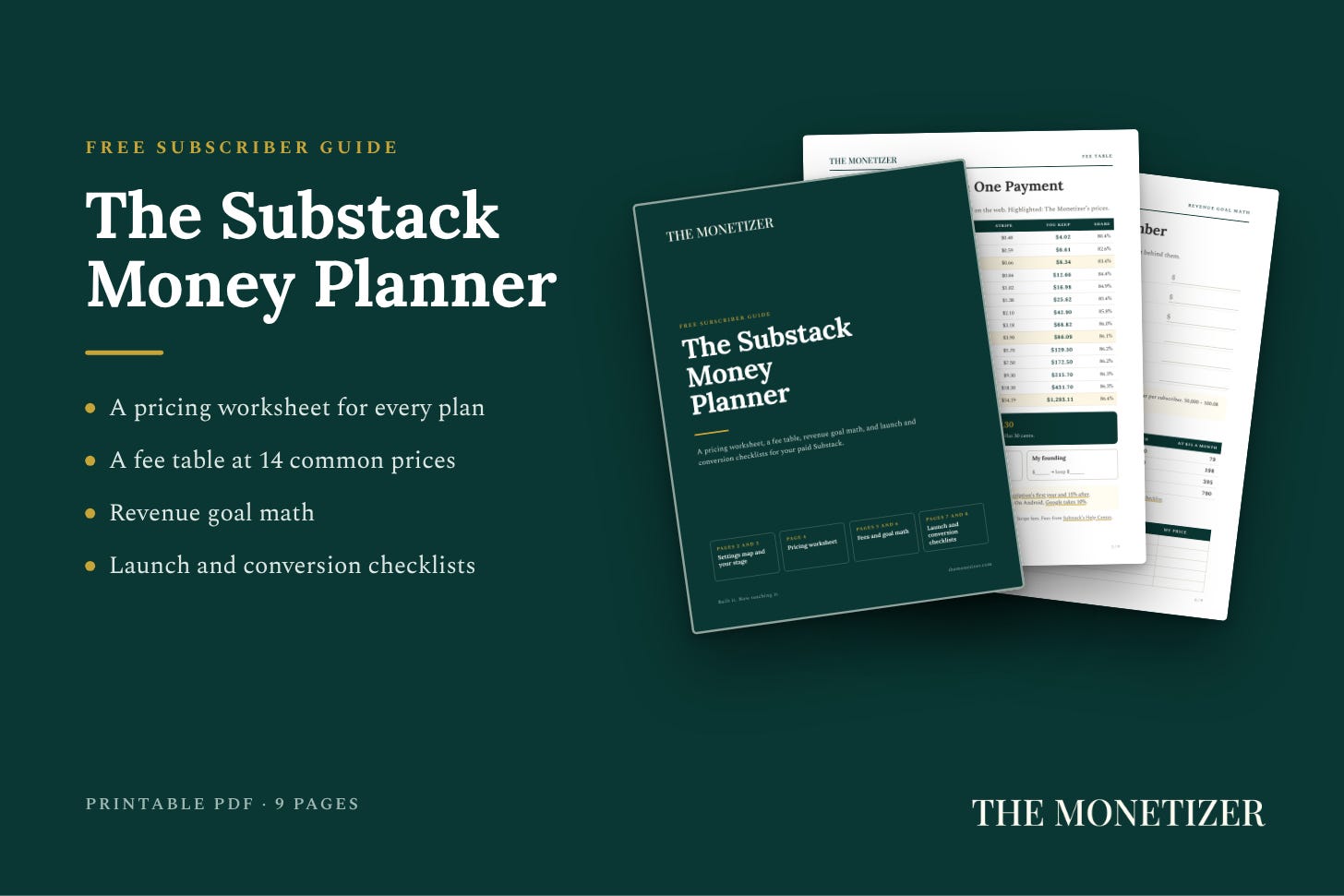
I turned this guide into a printable planner you can fill in:
A pricing worksheet for your monthly, annual, and founding plans
A fee table that shows what you keep at common prices
Revenue goal math: how many paid subscribers your income goal takes
Launch and conversion checklists for every setting in this guide
It’s free for free and paid subscribers. Subscribe to unlock the download below.