


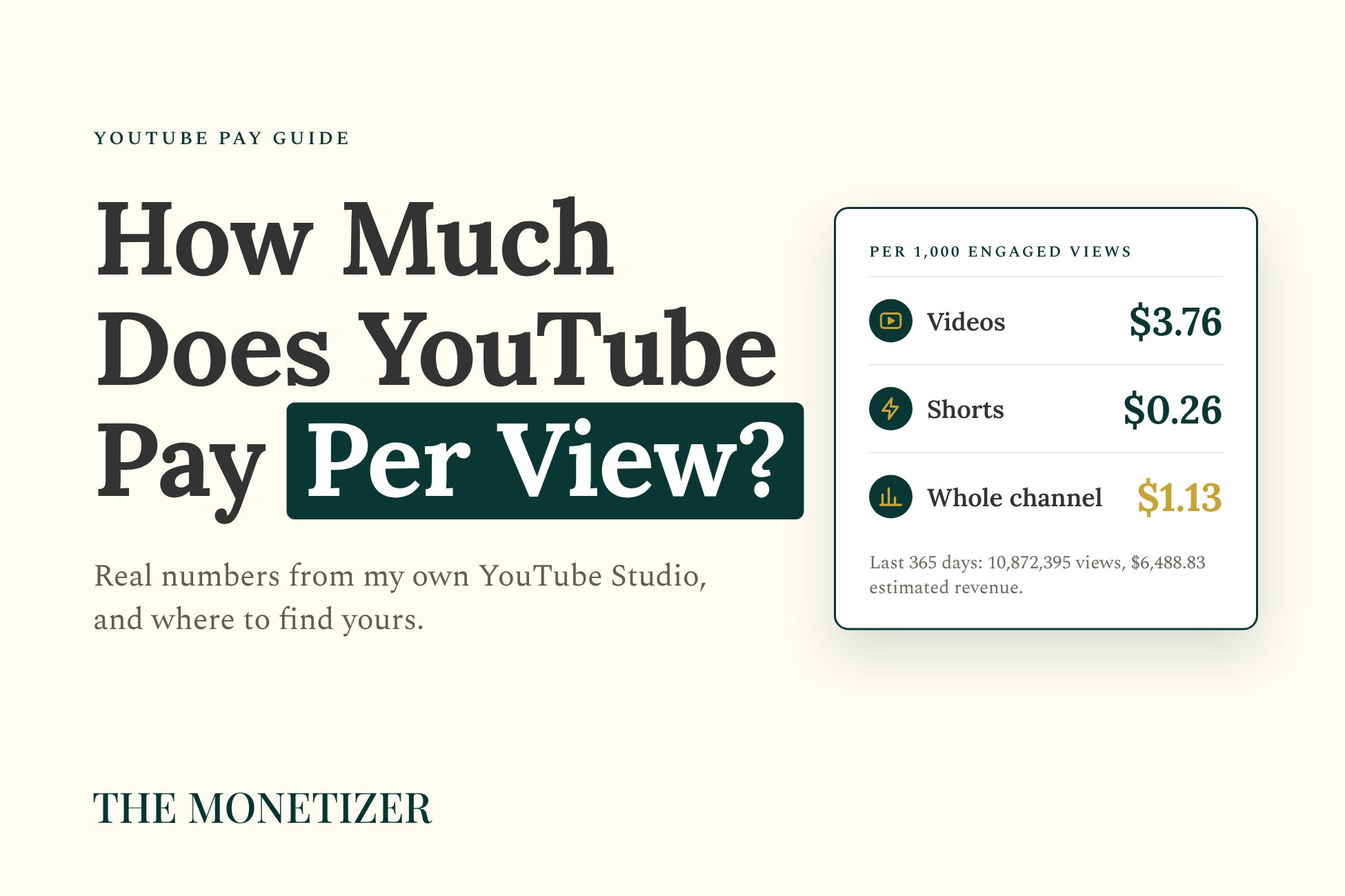
In the last 365 days, my entertainment news channel got 10,872,395 views on YouTube, and YouTube estimates it earned $6,488.83 from them. That’s what YouTube pays per view on my channel: about 60 cents for every 1,000 views.
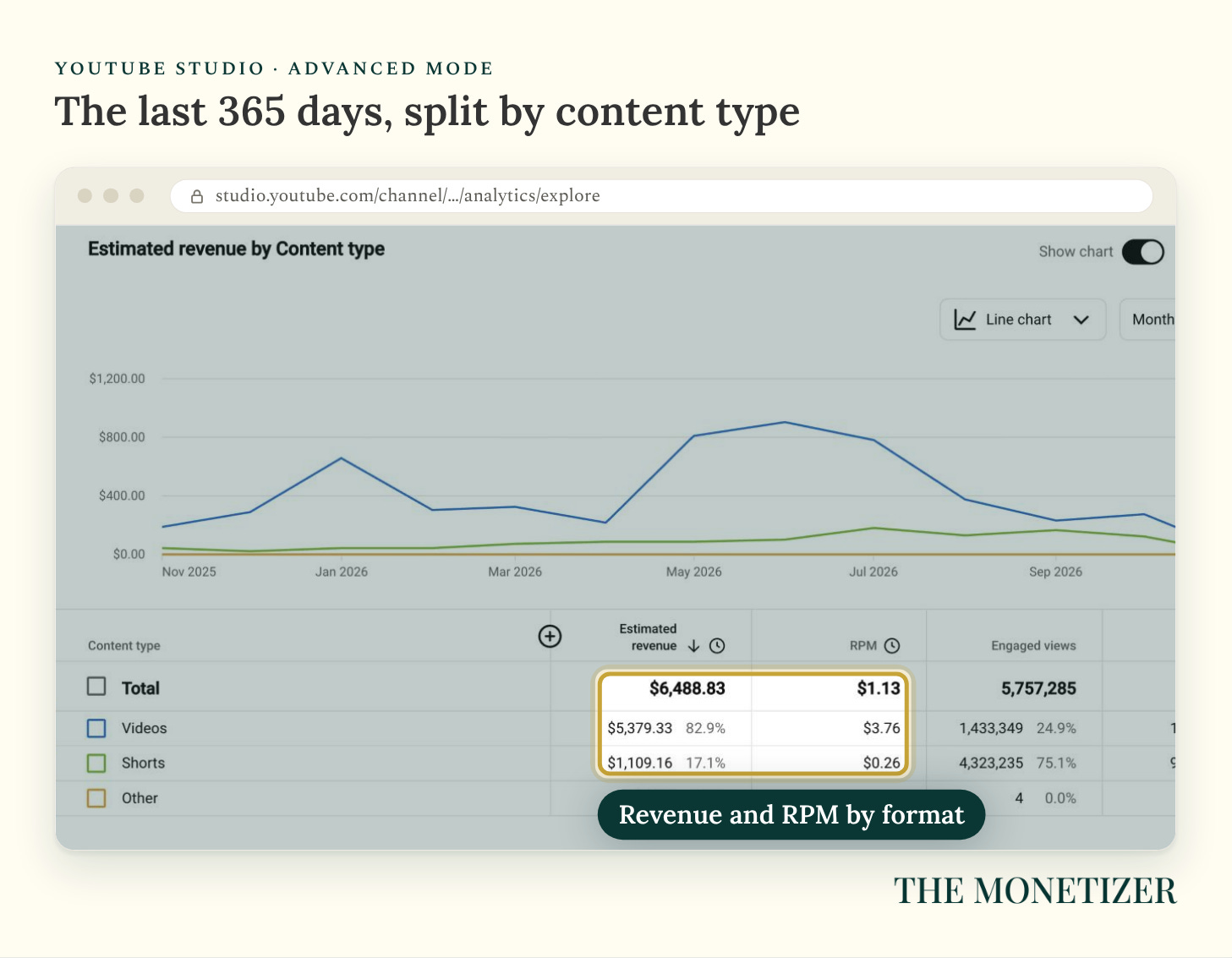
That average hides a split. Long-form videos earned $3.76 for every 1,000 engaged views, while Shorts earned $0.26, so one format paid more than 14 times as much per view on the same channel over the same 12 months. So the honest answer to “how much does YouTube pay per view” is that it depends on what you post, who watches, where they live, and what month it is.
Every screenshot below comes from my own YouTube Studio, with the channel name, logo, and video thumbnails blurred. The numbers are real, and paid subscribers get a printable kit at the bottom of this post. By the end, you’ll know:
What YouTube pays per view for long-form videos and Shorts, with real numbers.
Where to find your own RPM in YouTube Studio, step by step.
The four things that moved my pay more than views did.
What changes on February 1, 2027, and why it hits Shorts hardest.
The Short Answer: What YouTube Pays Per View
YouTube doesn’t actually pay you per view. It shares what advertisers spend to show ads on your videos, plus a cut of YouTube Premium subscriptions. The number that tells you what you really earn is your RPM, short for revenue per mille, which is what you keep per 1,000 engaged views after YouTube takes its share. Over the last year, mine came to:
$3.76 per 1,000 engaged views on long-form videos. A little more than a third of a cent per view.
$0.26 per 1,000 engaged views on Shorts. About a fortieth of a cent per view.
$1.13 per 1,000 engaged views overall, because most of my views came from Shorts.
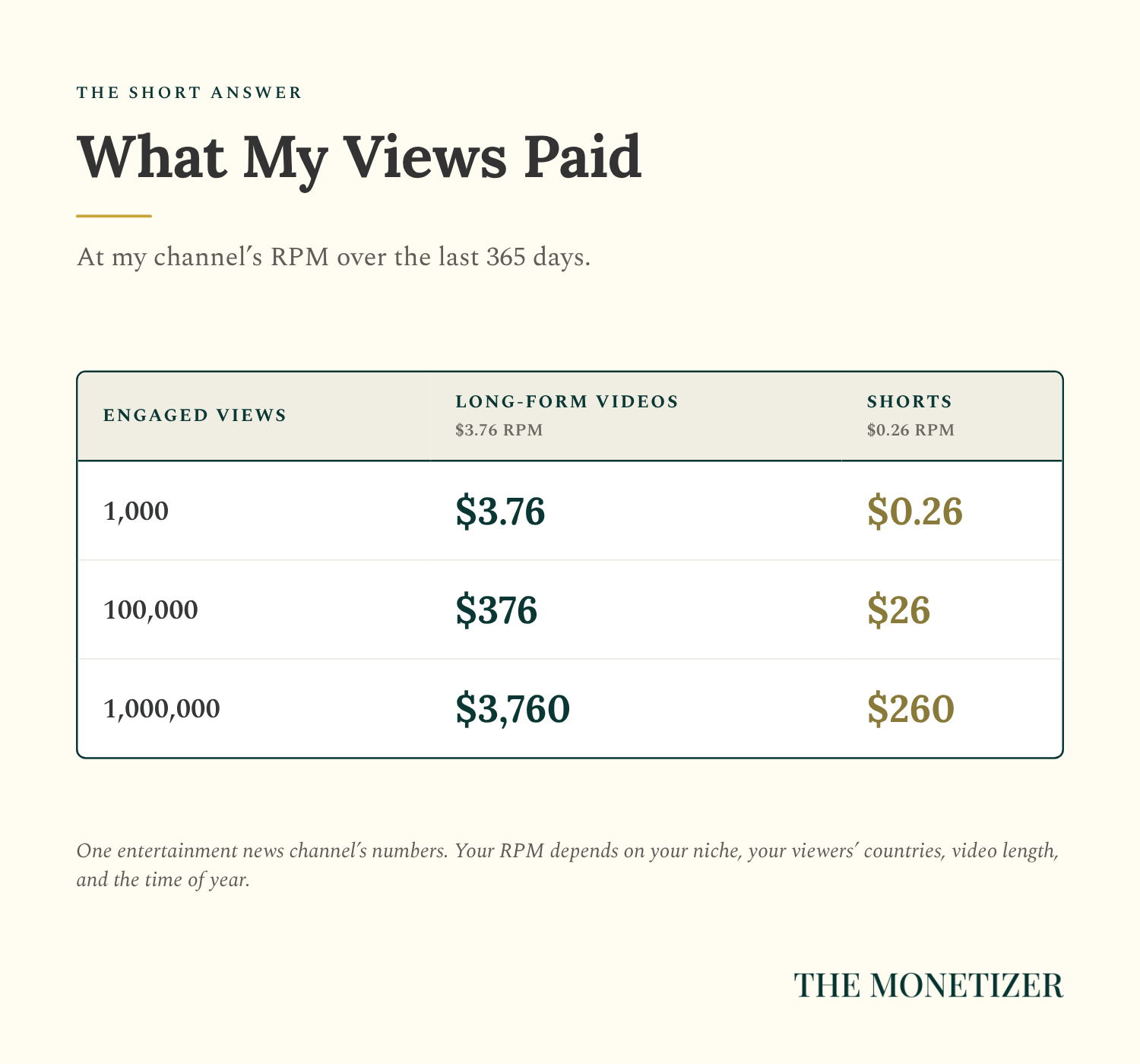
Scale those up to the view counts people actually search for, and the gap gets big fast:
An engaged view is one where someone clicked to watch or kept watching past the first few seconds. YouTube uses engaged views to calculate your RPM, split the Shorts ad pool, and count Shorts views toward the Partner Program, and there are fewer of them than the view count on your videos.
Why the Answer Changed in 2026
Two changes make older answers to this question unreliable: one already happened, and the other starts in February.
YouTube Now Counts a View From the First Frame
On August 24, 2026, YouTube started counting a view the moment a video starts playing, including autoplay in the feed (YouTube). The old definition, clicking to watch or watching past the first few seconds, is now called an engaged view.
That made view counts bigger, but it didn’t change how you qualify to earn, because YouTube still uses engaged views for that. The gap is wide. My Analytics overview shows 754.4K views for the last 28 days, while Advanced mode shows 342,146 engaged views for the same period, which is fewer than half.
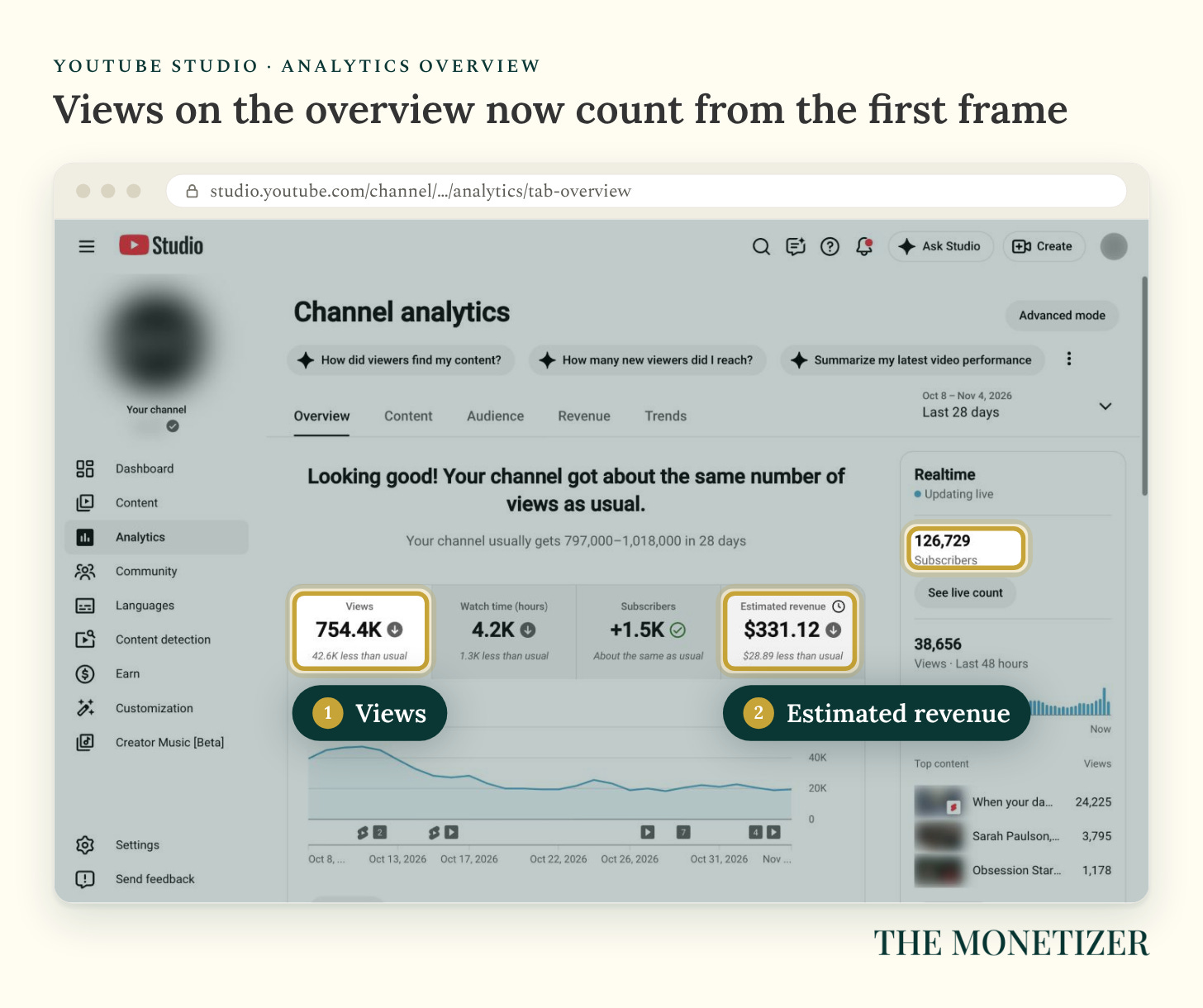
So don’t divide your revenue by your total views, or YouTube will look stingier than it is. Use the RPM Studio gives you, which it now calculates per 1,000 engaged views.
The Partner Program Gets Harder on February 1, 2027
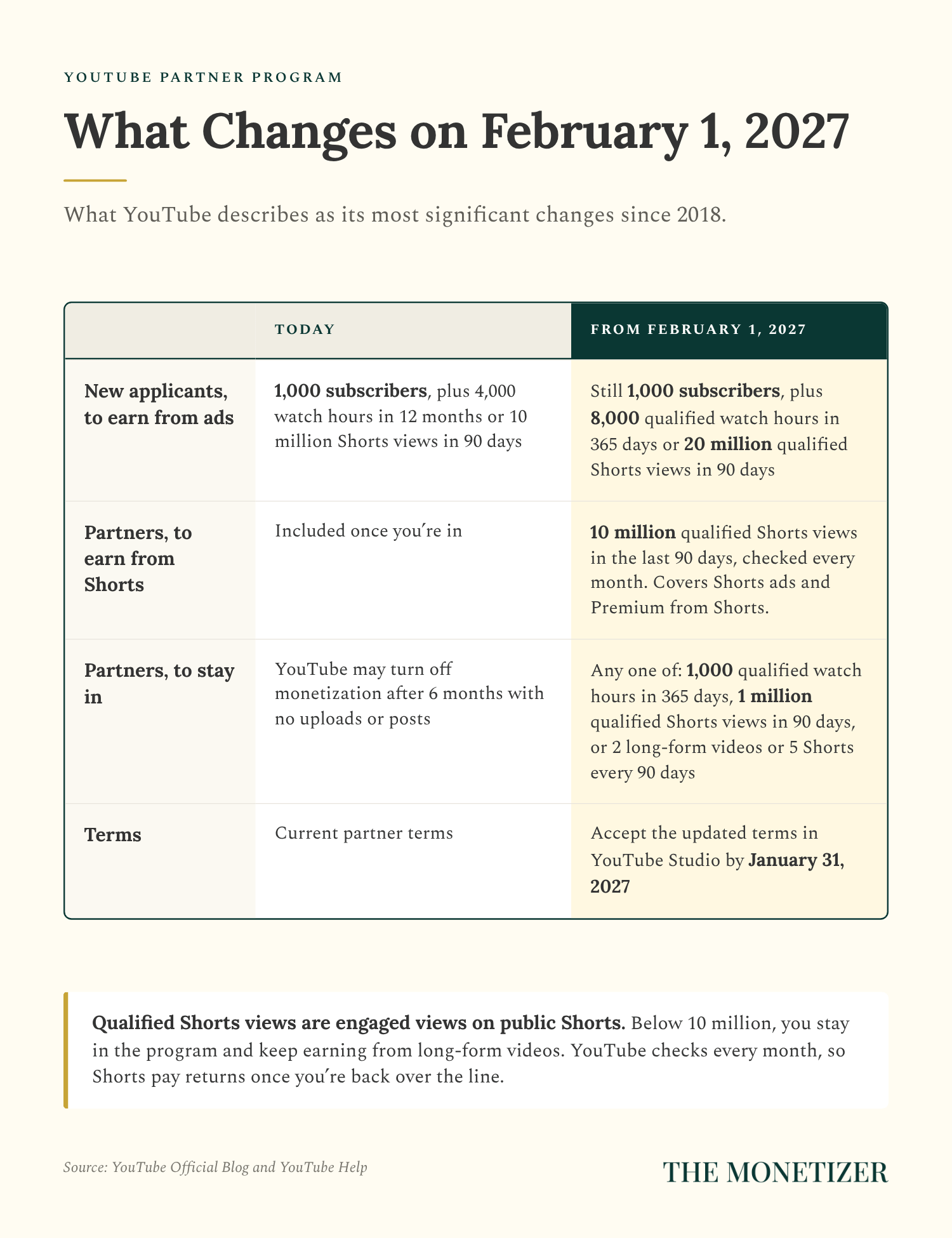
YouTube announced changes to the Partner Program that it describes as its most significant since 2018 (YouTube). Starting February 1, 2027:
New applicants need twice as much to earn from ads: 1,000 subscribers plus 8,000 qualified watch hours in the last 365 days, or 20 million qualified Shorts views in the last 90 days (YouTube). Current partners aren’t affected by this one.
Every partner needs 10 million qualified Shorts views in the last 90 days to earn from Shorts. That covers Shorts ad revenue and YouTube Premium revenue from Shorts. YouTube checks each month, using the 90 days that end on the 15th of the month before (YouTube). Channels below the line stay in the program and keep earning from long-form videos.
Partners have to stay active to stay in the program: 1,000 qualified watch hours in the last 365 days, 1 million qualified Shorts views in the last 90 days, or 2 long-form videos or 5 Shorts uploaded every 90 days. Fall short, and YouTube gives you an extra 90 days to get back over the watch-hour or Shorts-view bar.
Every partner has to accept updated terms in YouTube Studio by January 31, 2027 (YouTube). Miss it, and the features those terms cover stop paying on February 1 until you accept.
The Shorts rule hits my channel, and not gently. Qualified Shorts views are engaged views on public Shorts (YouTube), and my Shorts got 4,323,235 of them over the last year, or about 1.1 million every 90 days. Unless that grows more than ninefold, my Shorts stop earning in February. Last year they brought in $1,109.16, counting Premium revenue from Shorts, which is 17.1% of my channel’s YouTube revenue.
If you’re close to today’s requirements, hit them and apply soon. YouTube says reviews typically take about a month, and the entry bar doubles on February 1.
How YouTube Actually Pays You
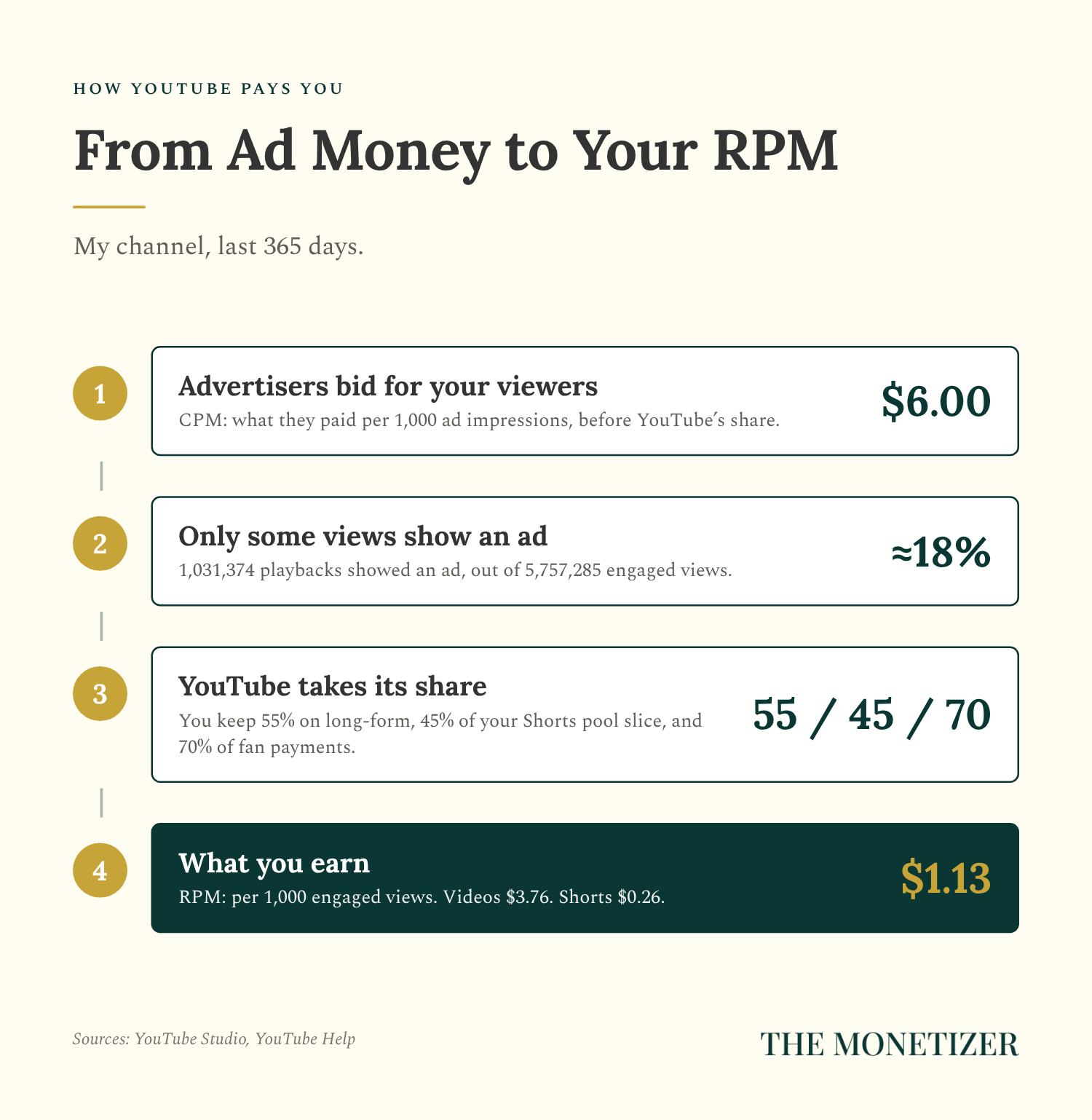
Three numbers in YouTube Studio explain your pay, and these are mine for the last 12 months (YouTube):
CPM: $6.00. What advertisers paid for every 1,000 ad impressions on my videos, before YouTube’s share.
Playback-based CPM: $9.11. What advertisers paid for every 1,000 playbacks that showed at least one ad.
RPM: $1.13. What I earned for every 1,000 engaged views, after YouTube’s share, counting views that showed no ads at all.
Two things push RPM far below CPM: YouTube keeps part of the money, and most views never show an ad at all. YouTube estimates that 1,031,374 playbacks on my channel showed an ad last year, which works out to about 18% of my 5,757,285 engaged views.
Your share depends on where the money comes from (YouTube):
Long-form videos: you keep 55% of the net ad revenue from your videos.
Shorts: ads between Shorts are pooled each month. Part of the pool covers music licensing, the rest is split by each creator’s share of engaged views in each country, and you keep 45% of your slice (YouTube).
Memberships, Super Chat, Super Stickers, and Super Thanks: you keep 70% of net revenue.
YouTube Premium: members don’t see ads, so YouTube pays creators from subscription revenue based on what members watch.
Part 1: Find Your Real Numbers in YouTube Studio
Now find your own numbers. Every step below happens in YouTube Studio on a computer, and the whole thing takes about ten minutes.
Step 1: Open the Revenue Tab
Go to YouTube Studio, click Analytics in the left menu, then click Revenue. The top card shows your estimated revenue for the last 28 days, with a chart by day.
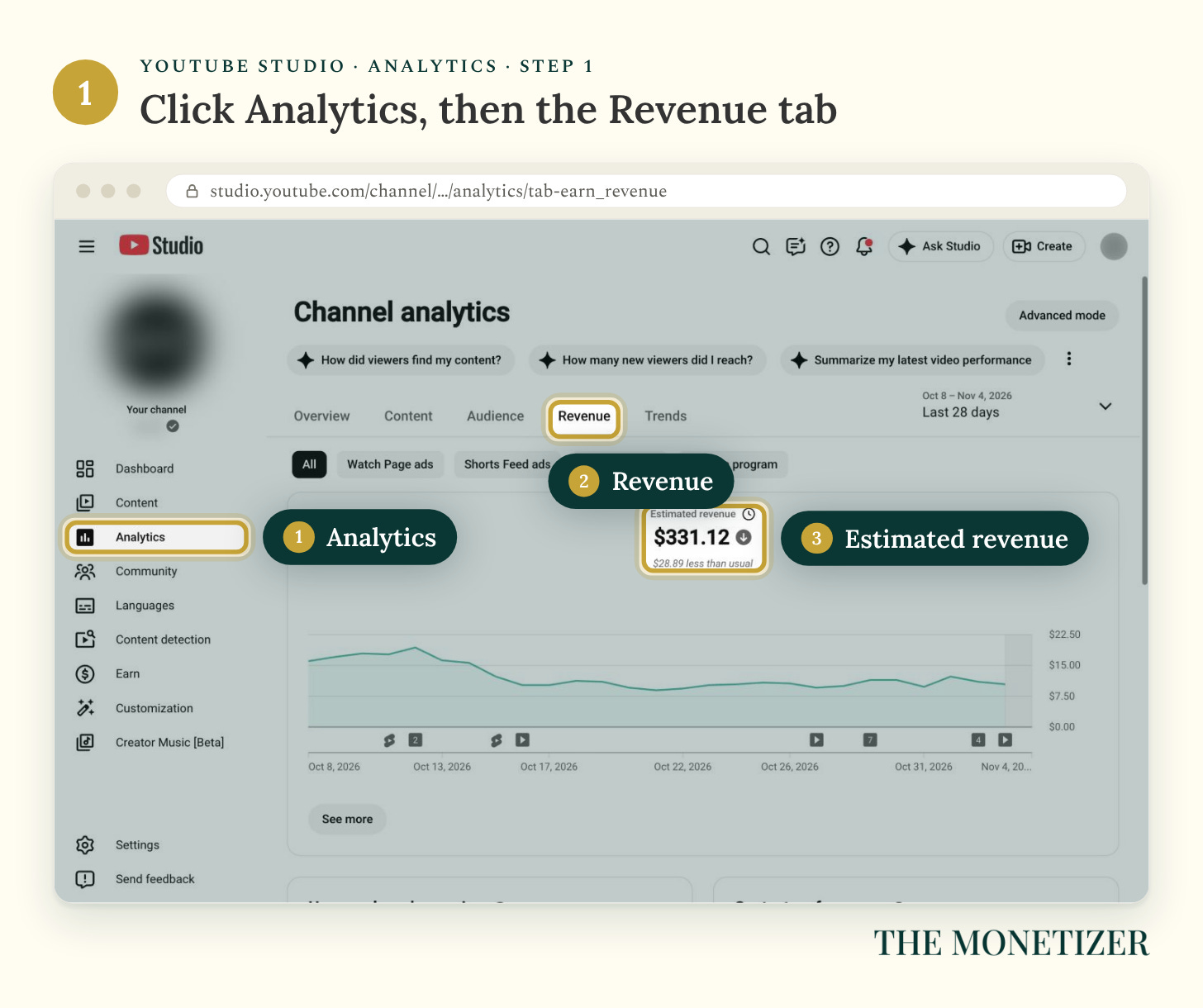
That word “estimated” matters, because YouTube finalizes each month between the 7th and 12th of the next month, after adjusting for things like invalid traffic and copyright claims (YouTube).
Step 2: Check Your Earnings by Month
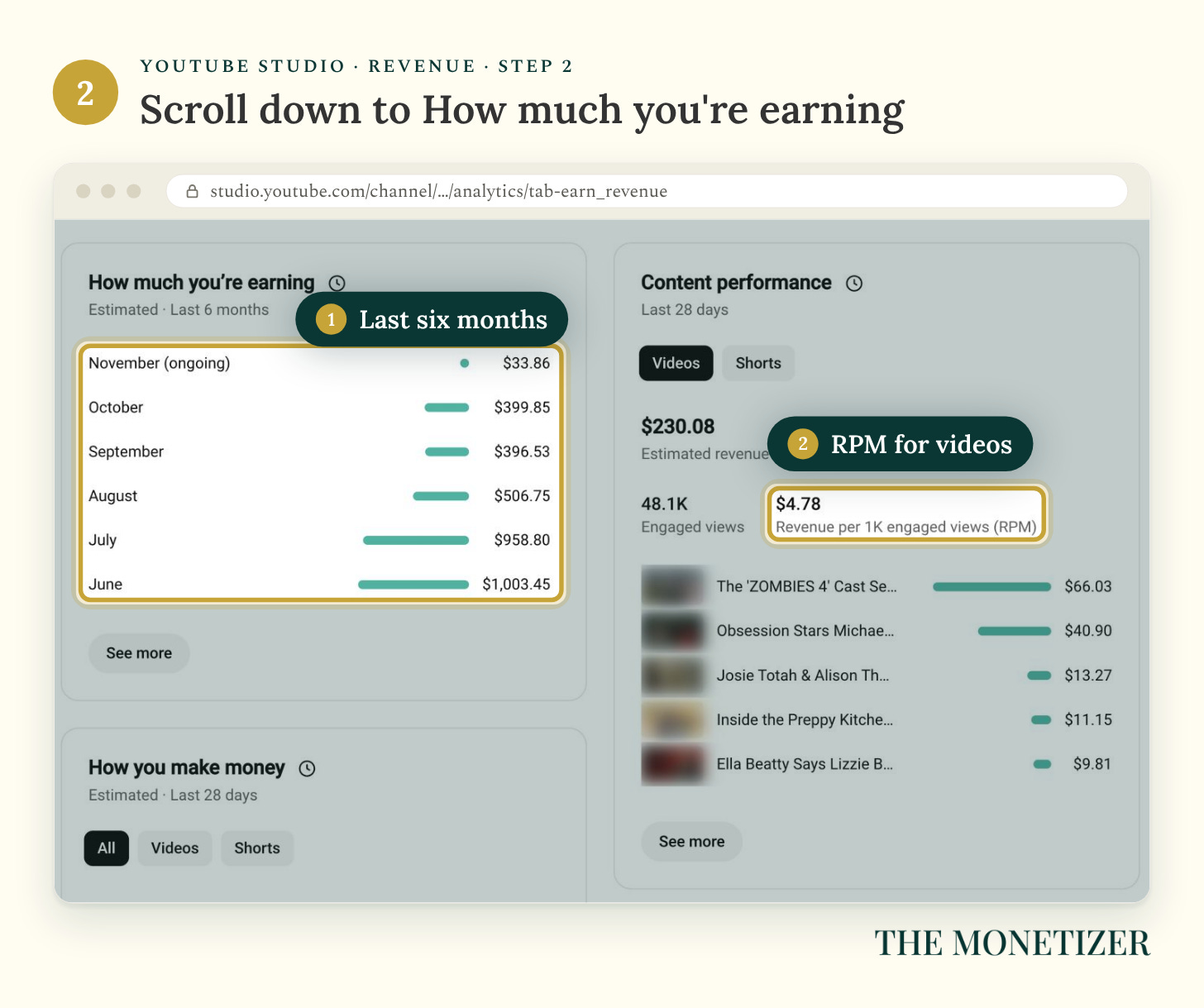
Scroll down to How much you’re earning, which lists your estimated revenue for each of the last six months. Mine dropped by more than half between June and October, and fewer views explain only part of that (Part 2 shows the rest).
Step 3: Compare Your Videos and Your Shorts
Next to it, Content performance shows revenue, engaged views, and RPM for one format at a time. Click Videos and note your RPM. Then click Shorts.
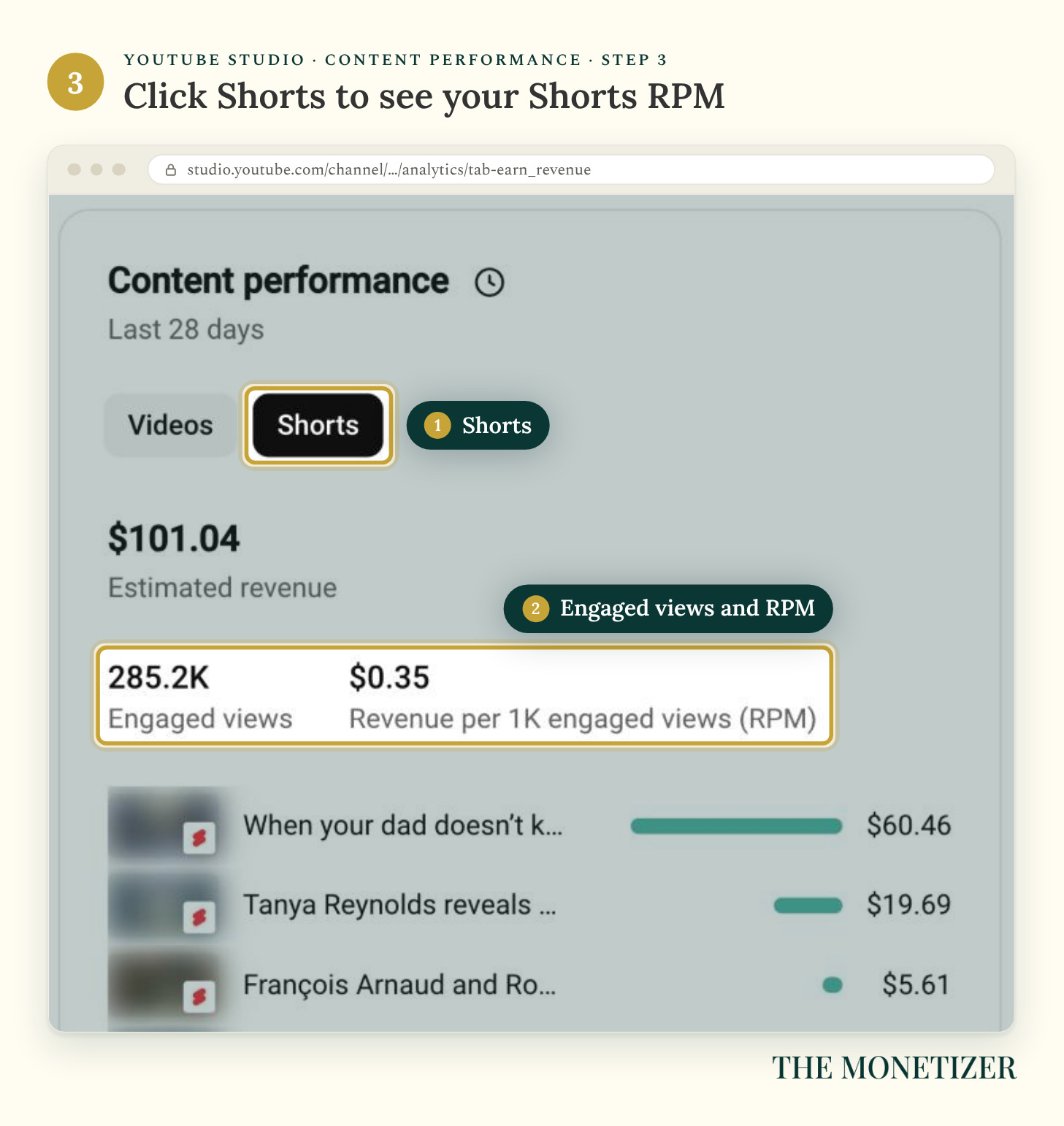
These 28-day numbers bounce around more than yearly ones do. Over 12 months, my videos averaged $3.76 and my Shorts averaged $0.26.
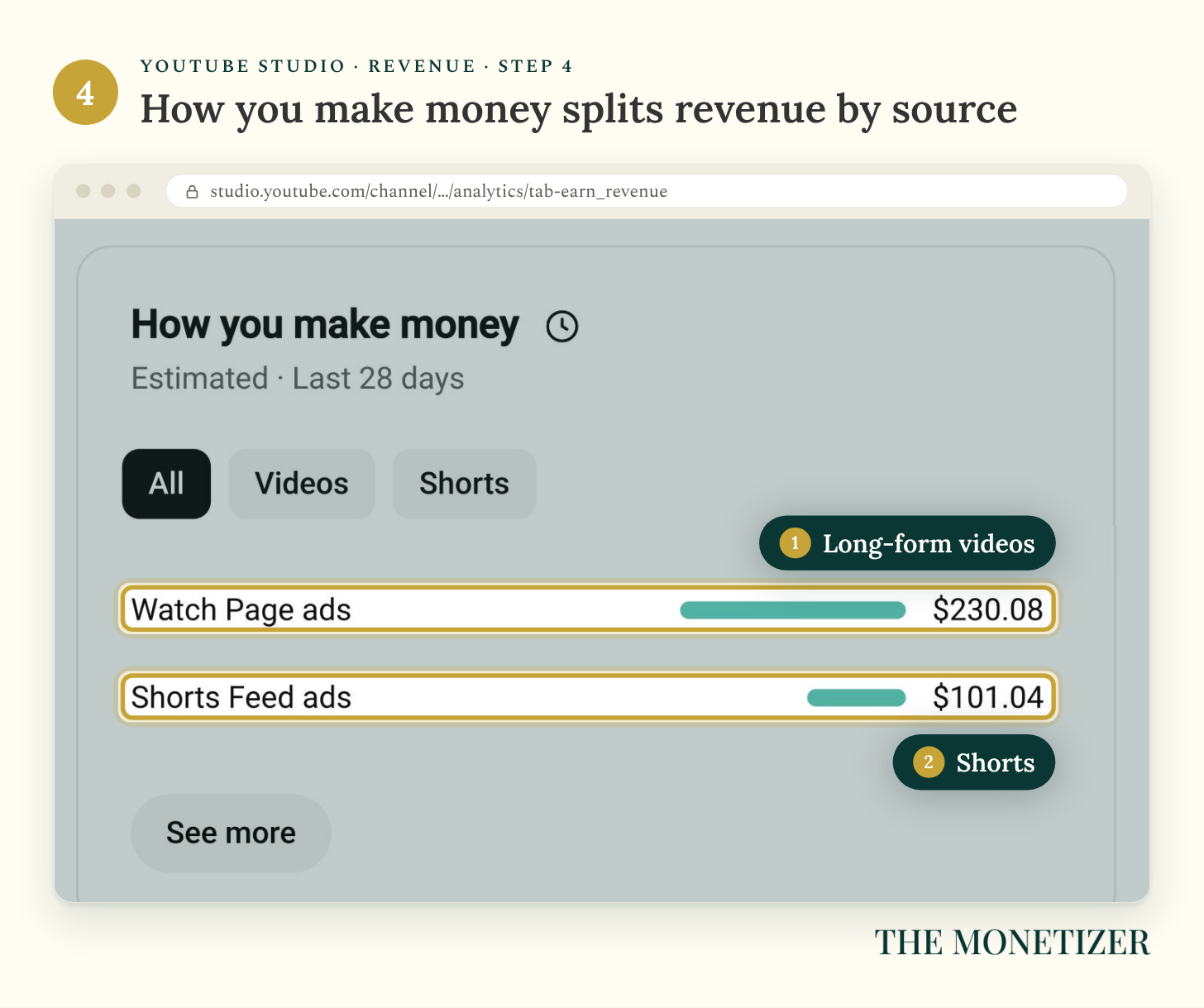
Step 4: See Where the Money Came From
Scroll to How you make money, which splits your revenue by source. If you earn from memberships, Supers, or Premium, those show up as their own lines in the full report.
Step 5: Open Advanced Mode and Add RPM and CPM
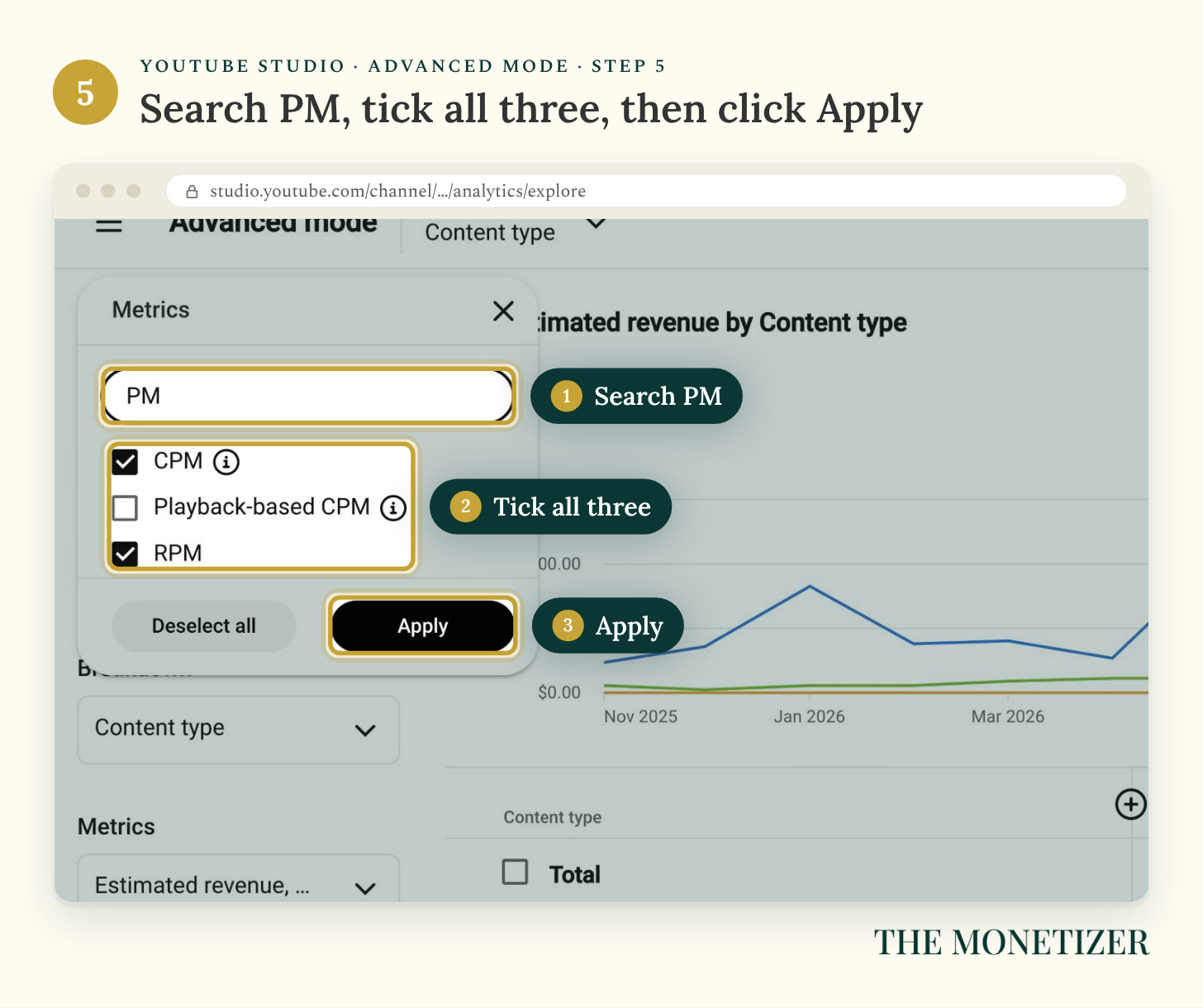
The best numbers live in Advanced mode. Click Advanced mode at the top right of Analytics. Click the Metrics menu on the left, search for “PM,” and tick RPM, CPM, and Playback-based CPM. Then click Apply.
Step 6: Break Your Revenue Down by Content Type
Set Breakdown to Content type and the date range to Last 365 days. You’ll get the table from the top of this post: revenue, RPM, and engaged views for videos and Shorts, side by side. A full year smooths out the monthly swings.
Step 7: Break It Down by Month
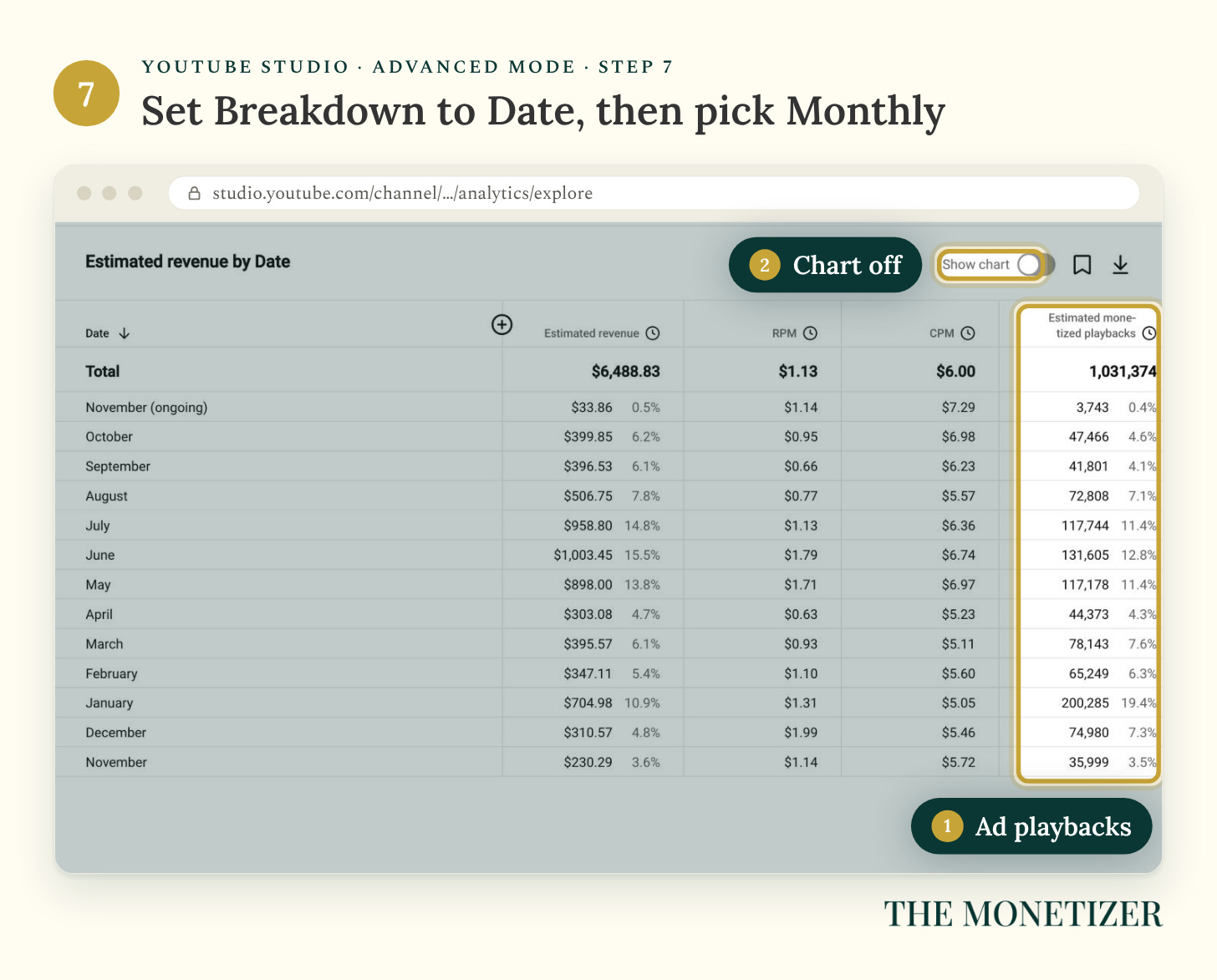
Change Breakdown to Date and set the interval to Monthly. Add Estimated monetized playbacks from the Metrics menu, then turn off Show chart to see every month at once.
Step 8: Break It Down by Country
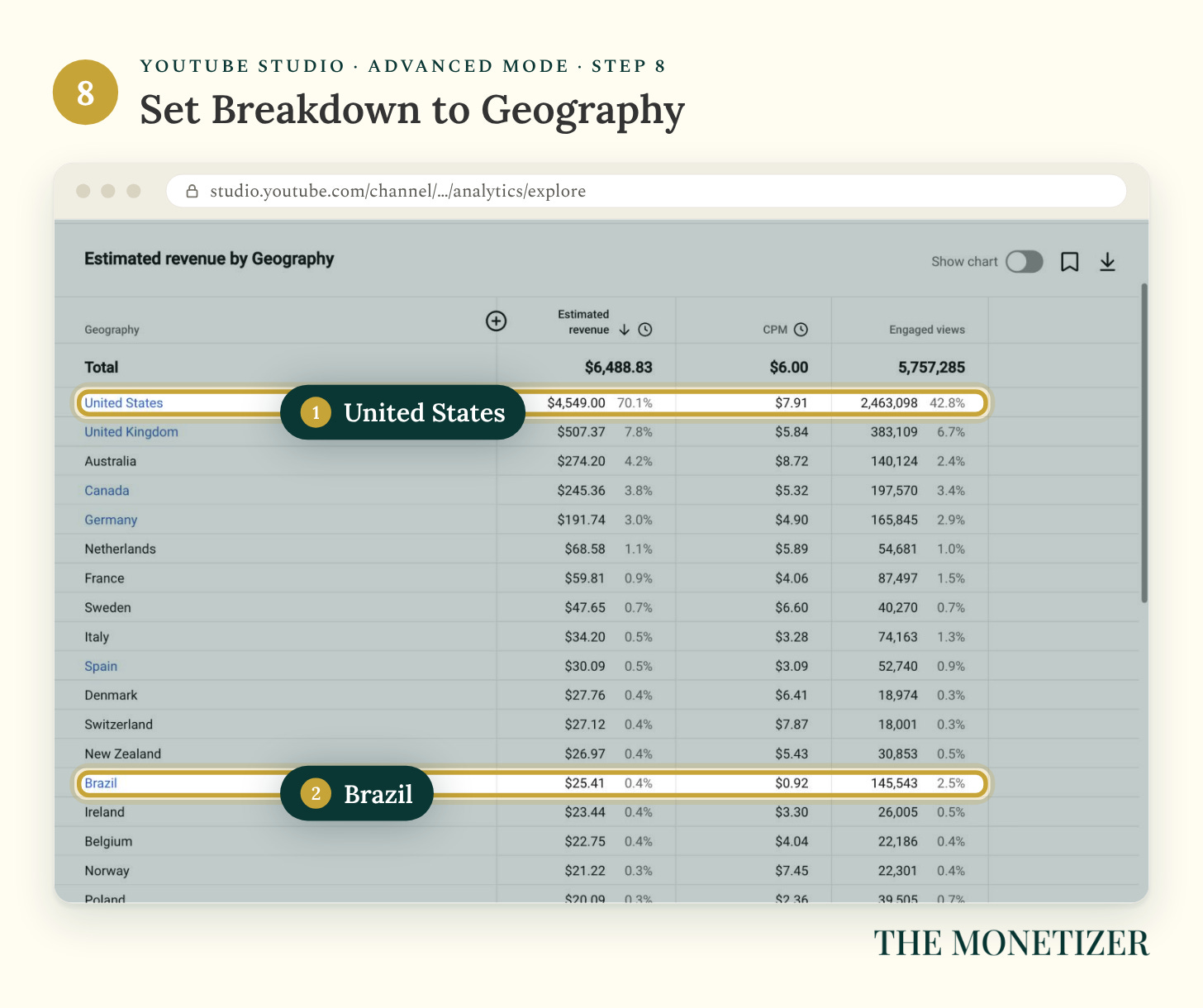
Set Breakdown to Geography. You’ll see what each country paid, its CPM, and its share of your engaged views.
Step 9: Break It Down by Revenue Source
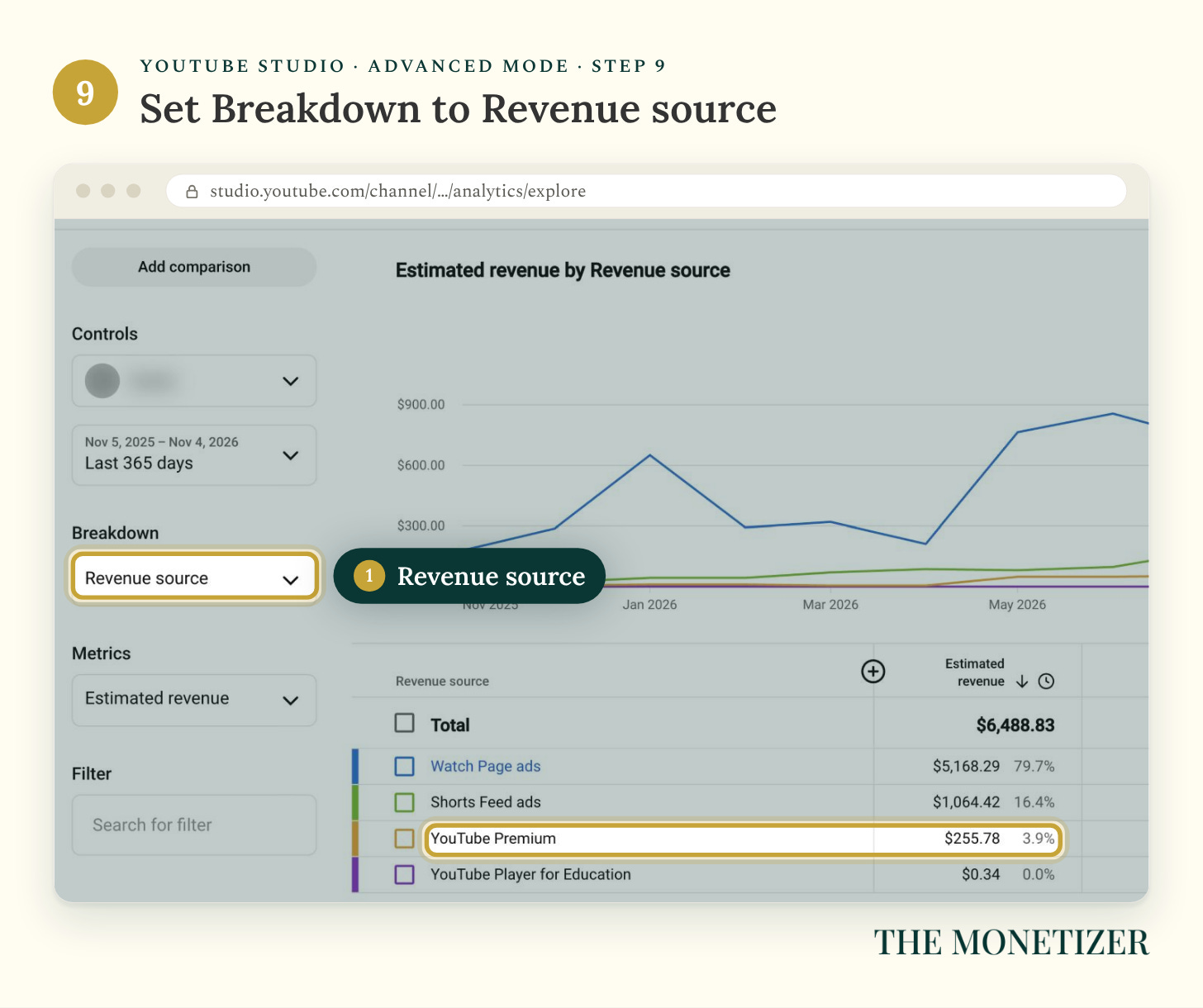
Set Breakdown to Revenue source to see the full year by where the money came from, including YouTube Premium.
Step 10: Find the Videos That Pay the Most
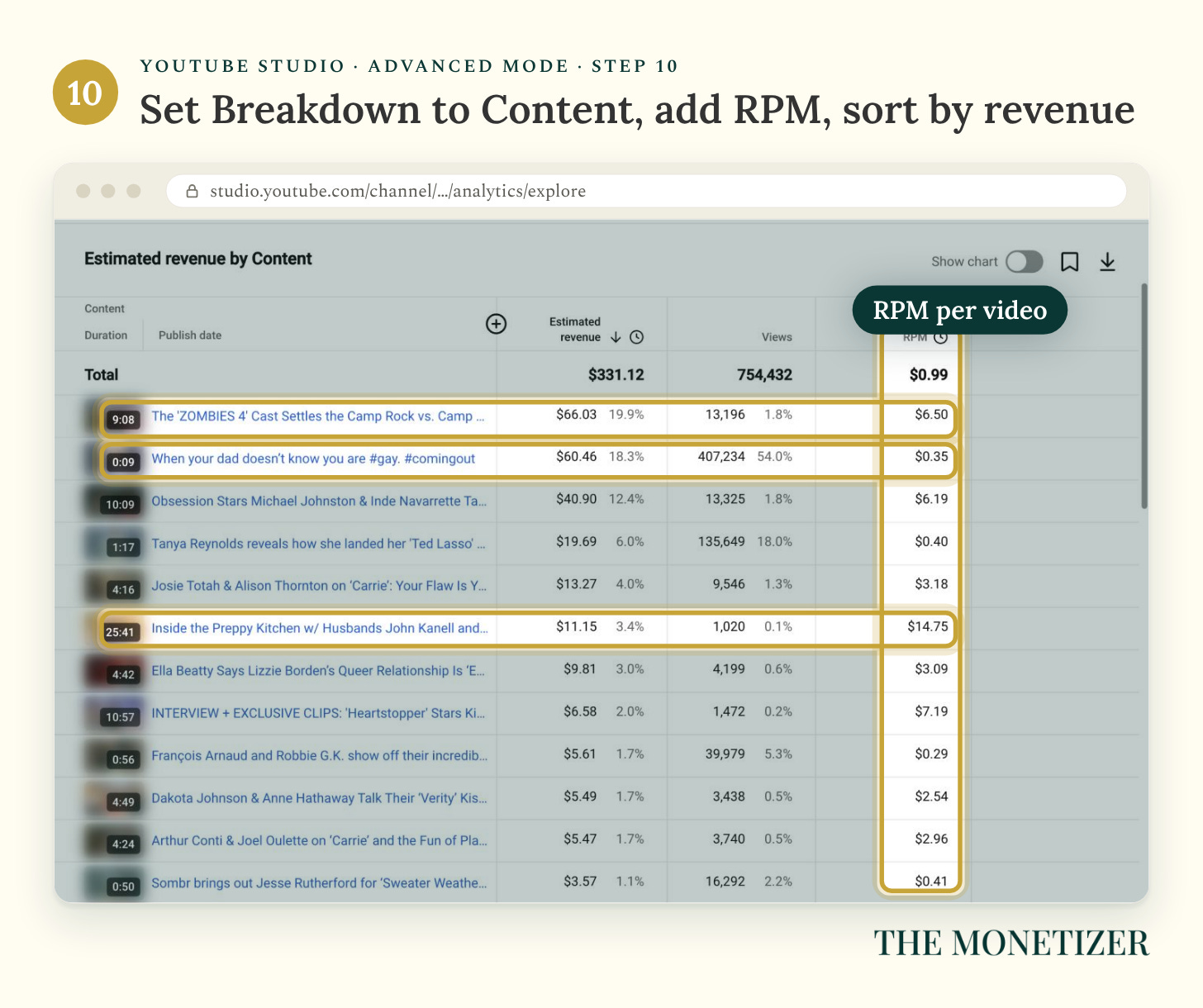
Set Breakdown to Content, add RPM, and sort by Estimated revenue. Check this view before you plan your next video.
Part 2: What Moved My Pay More Than Views
These are one channel’s numbers in one niche, so treat them as a real example rather than a rule, but the patterns are hard to miss. Four of them moved my pay more than views did.
Lesson 1: Long-Form Paid About 14 Times More Per View
Over the last year, my long-form videos got 24.9% of my engaged views and earned 82.9% of my revenue. Shorts got 75.1% of the engaged views and earned 17.1%.
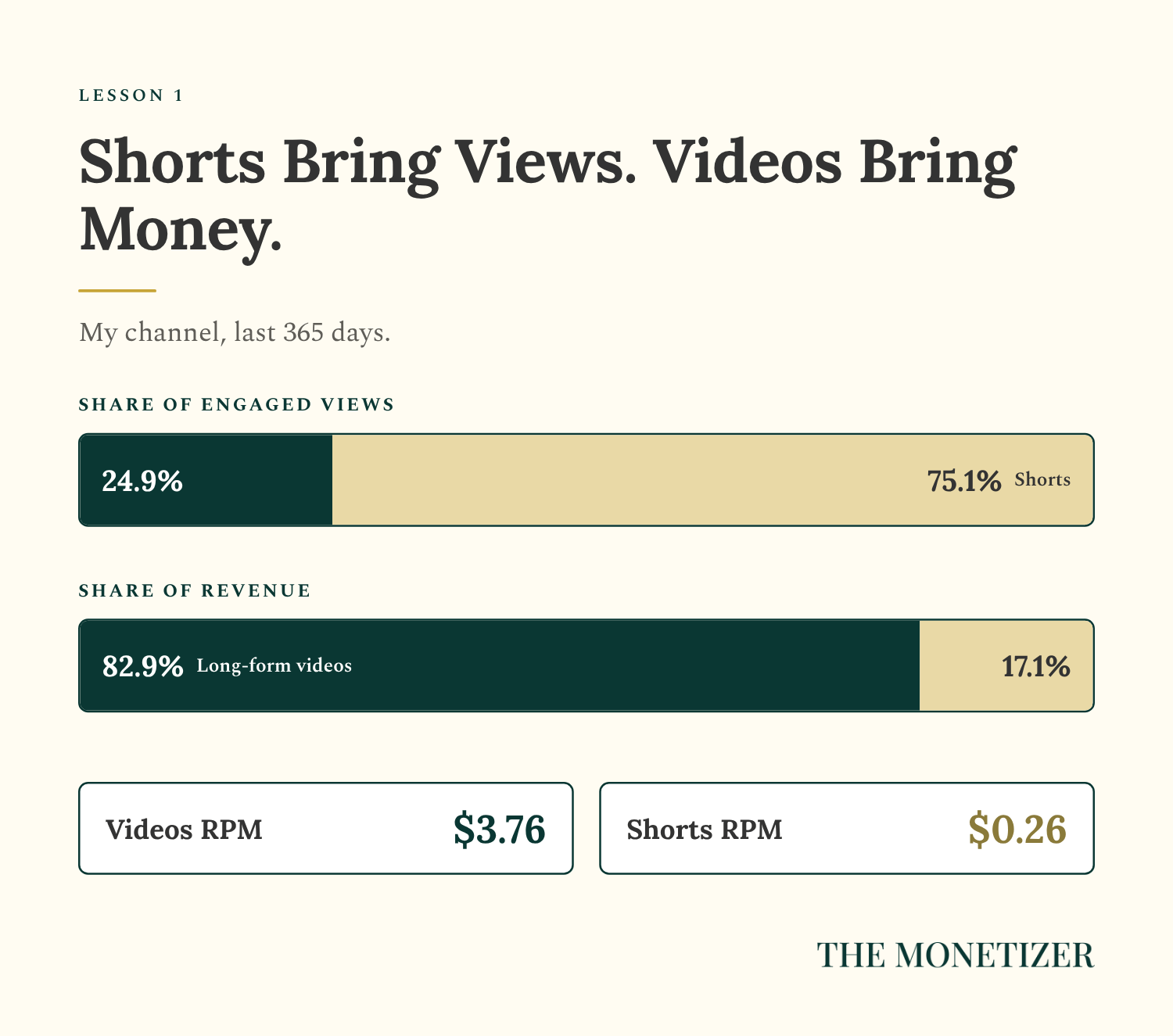
That’s the Shorts pool at work. Ads between Shorts get shared across every eligible creator and you keep 45% of your slice, while a long-form video earns from the ads that run on it.
Shorts still earn something, to be fair. My top Short, a nine-second clip from 2023, earned $60.46 in the last 28 days, and it took 407,234 views to get there. My top long-form video earned $66.03 from 13,196.
Lesson 2: Longer Videos Earned More Per View
Sort your videos by RPM and you may see the same pattern I do. Over the last 28 days, by video length:
25 minutes, 41 seconds: $14.75 RPM
9 to 11 minutes: $6.19 to $7.19 RPM
4 to 5 minutes: $2.54 to $3.18 RPM
Shorts, all under 90 seconds: $0.29 to $0.41 RPM
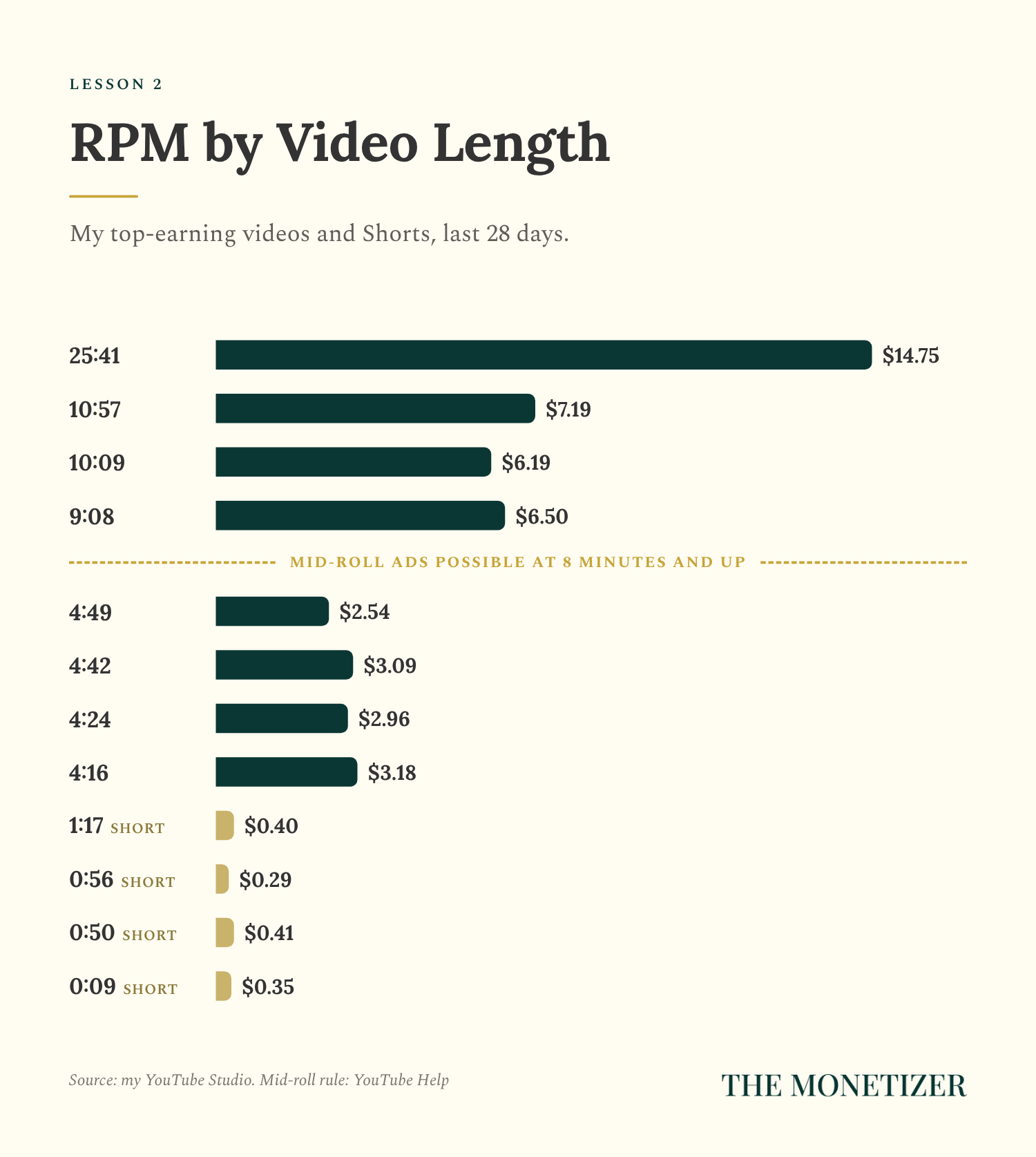
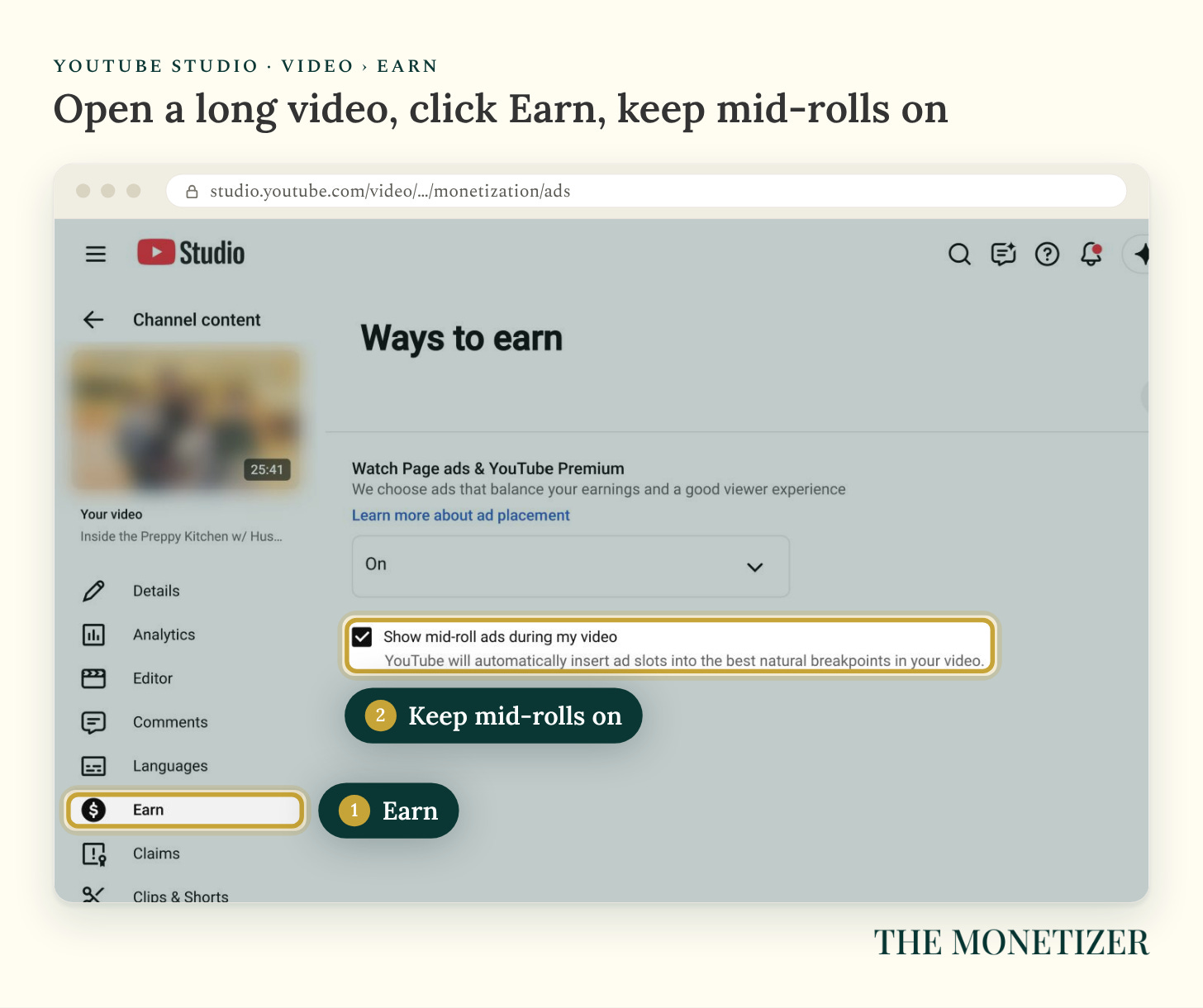
Length isn’t magic, and topic matters too, but there’s a mechanism behind the pattern. YouTube only places mid-roll ads, the ones that play partway through, in monetized videos that are “8 minutes or longer” (YouTube), and more ad slots mean more chances to earn.
Make sure mid-rolls are on. Open any long video in YouTube Studio, click Earn in the video’s menu, and look for Show mid-roll ads during my video. YouTube places the breaks automatically unless you change it.
Lesson 3: Where Viewers Live Changes Everything
Over the last year, viewers in the United States gave me 42.8% of my engaged views and 70.1% of my revenue. Advertisers paid a $7.91 CPM to reach them. In Brazil, they paid $0.92.
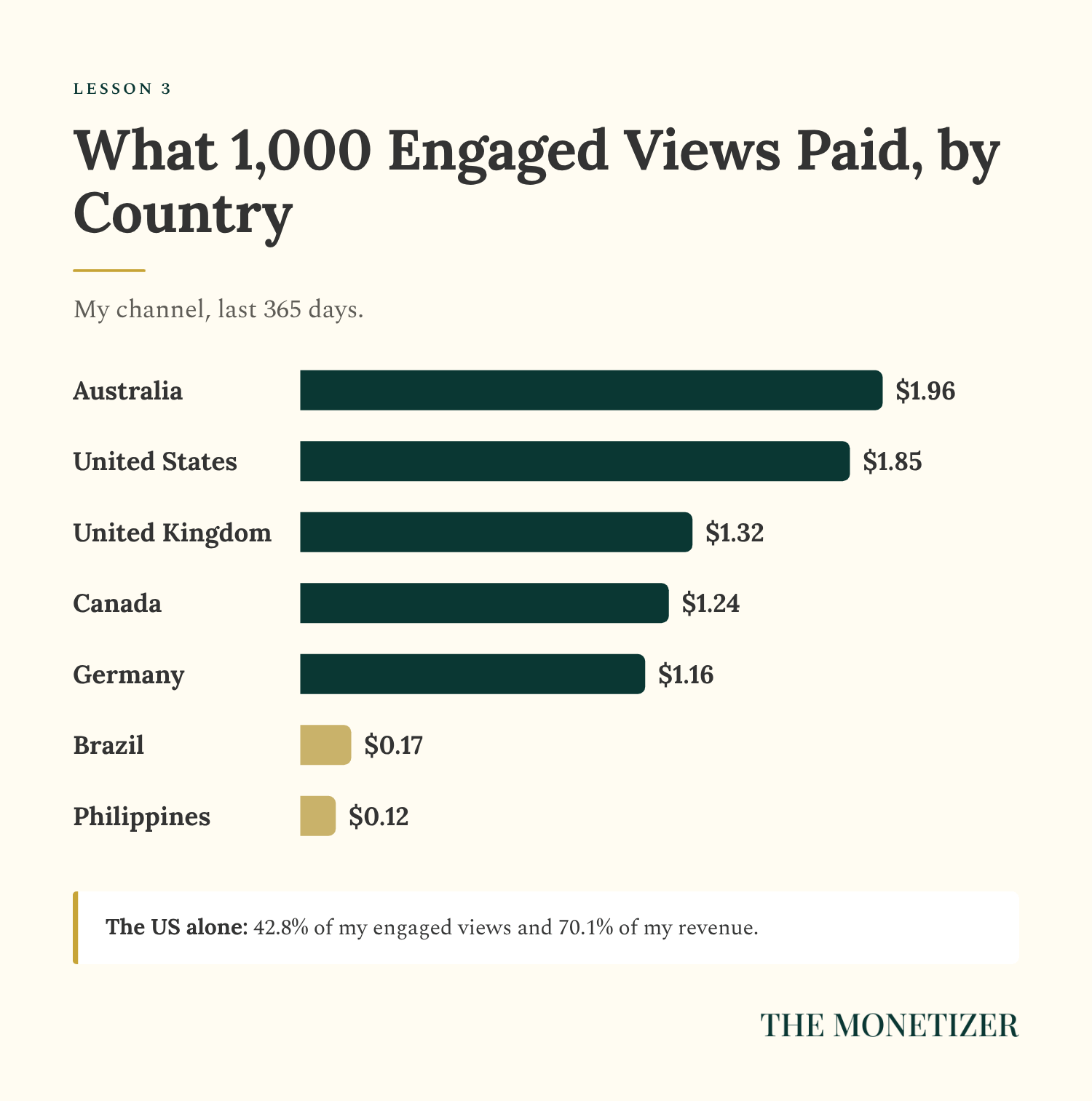
Per 1,000 engaged views, US viewers paid me $1.85, Brazil paid $0.17, and the Philippines paid $0.12. Same videos, yet a US view was worth about 15 times a view from the Philippines. You can’t pick your audience, but you can notice which topics pull viewers from higher-paying countries and make more of those.
Lesson 4: Pay Follows Ads, Not Views
June and September had almost the same engaged views: 559,304 in June and 595,541 in September, slightly more. But June paid $1,003.45, and September paid $396.53.
The difference was ads. YouTube estimates 131,605 playbacks showed an ad in June, against 41,801 in September, so September had less than a third of the ad playbacks.
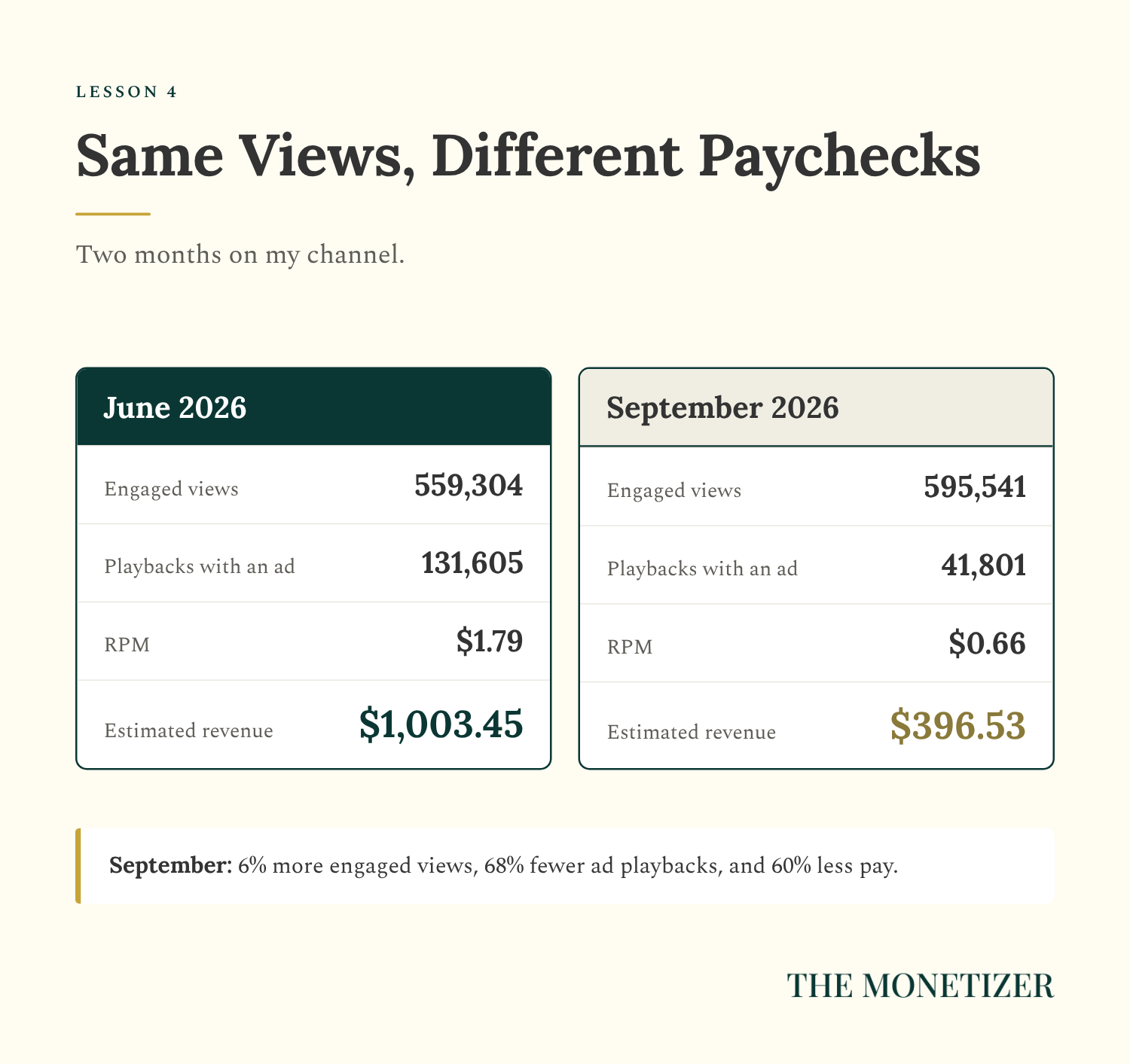
What pays is the ad playback, not the view. When fewer of your views carry ads, because they’re Shorts, short videos, or videos advertisers avoid, your pay drops even while views climb.
The calendar plays a part too. YouTube says advertisers often bid more before holidays (YouTube), and my CPM hit its low for the year in January, at $5.05.
Check for limited ads, too. If a video shows Limited ad earnings in the Notices column of your Content page, it can still run ads, but brands that only want to run on safer content will skip it, so it earns less. You can ask for a human review with the Appeal button on the video’s Impact summary card (YouTube).
Part 3: How to Get Paid by YouTube
What You Need to Qualify
To earn ad revenue today, you need 1,000 subscribers plus either 4,000 qualified watch hours on public long-form videos in the last 12 months or 10 million qualified Shorts views in the last 90 days (YouTube). You also need to follow YouTube’s channel monetization policies, turn on 2-Step Verification for your Google account, have advanced features access, have no active Community Guidelines strikes, link an AdSense for YouTube account, and live in a country where the program is available. From February 1, 2027, new applicants need 8,000 qualified watch hours or 20 million qualified Shorts views instead.
When you qualify, open Earn in YouTube Studio and apply. You’ll accept the program terms, connect AdSense for YouTube, and wait for a review.
Turn On the Ways to Earn
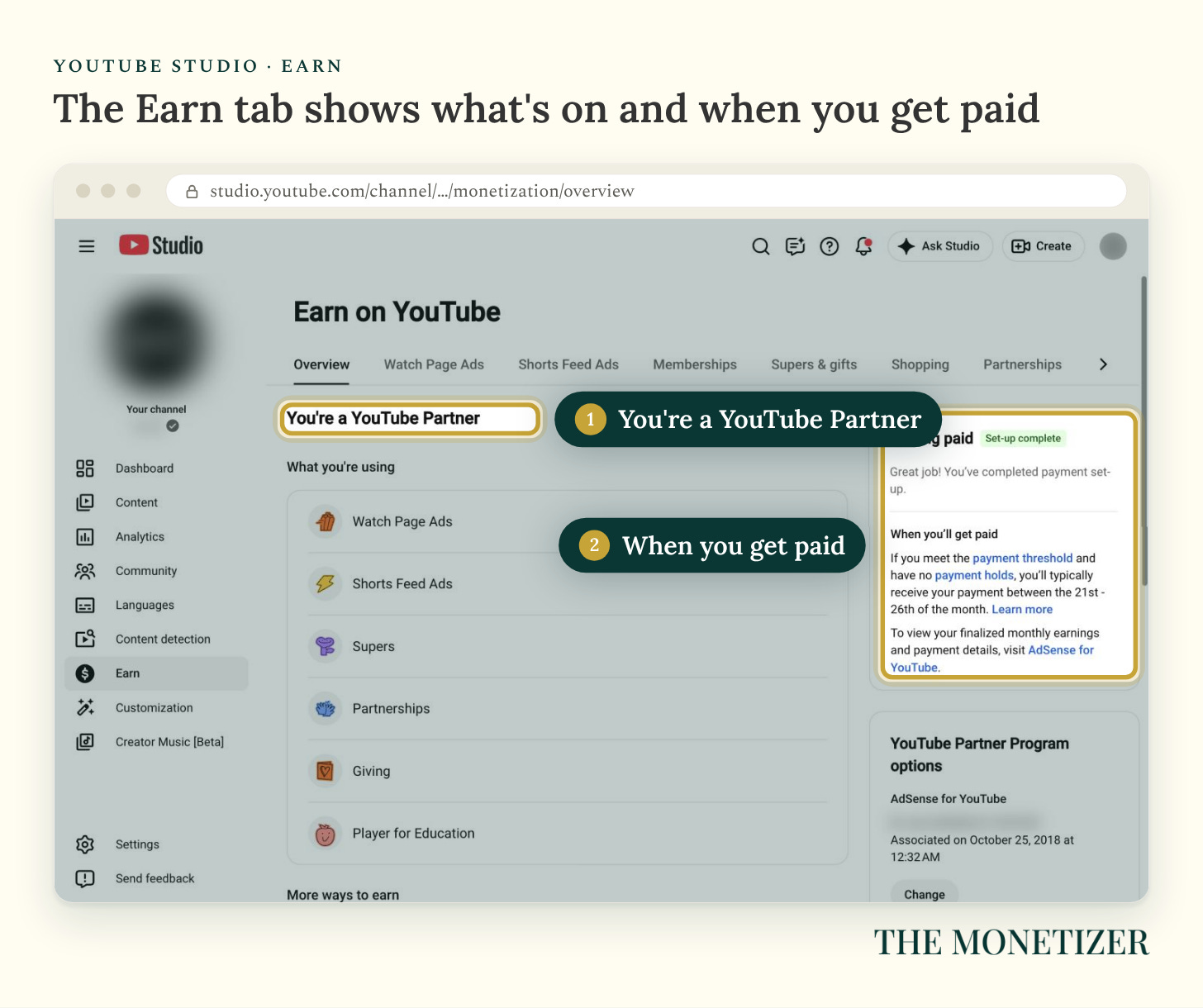
Once you’re in, the Earn tab shows what’s switched on. My channel runs Watch Page Ads, Shorts Feed Ads, Supers, Partnerships, Giving, and Player for Education.
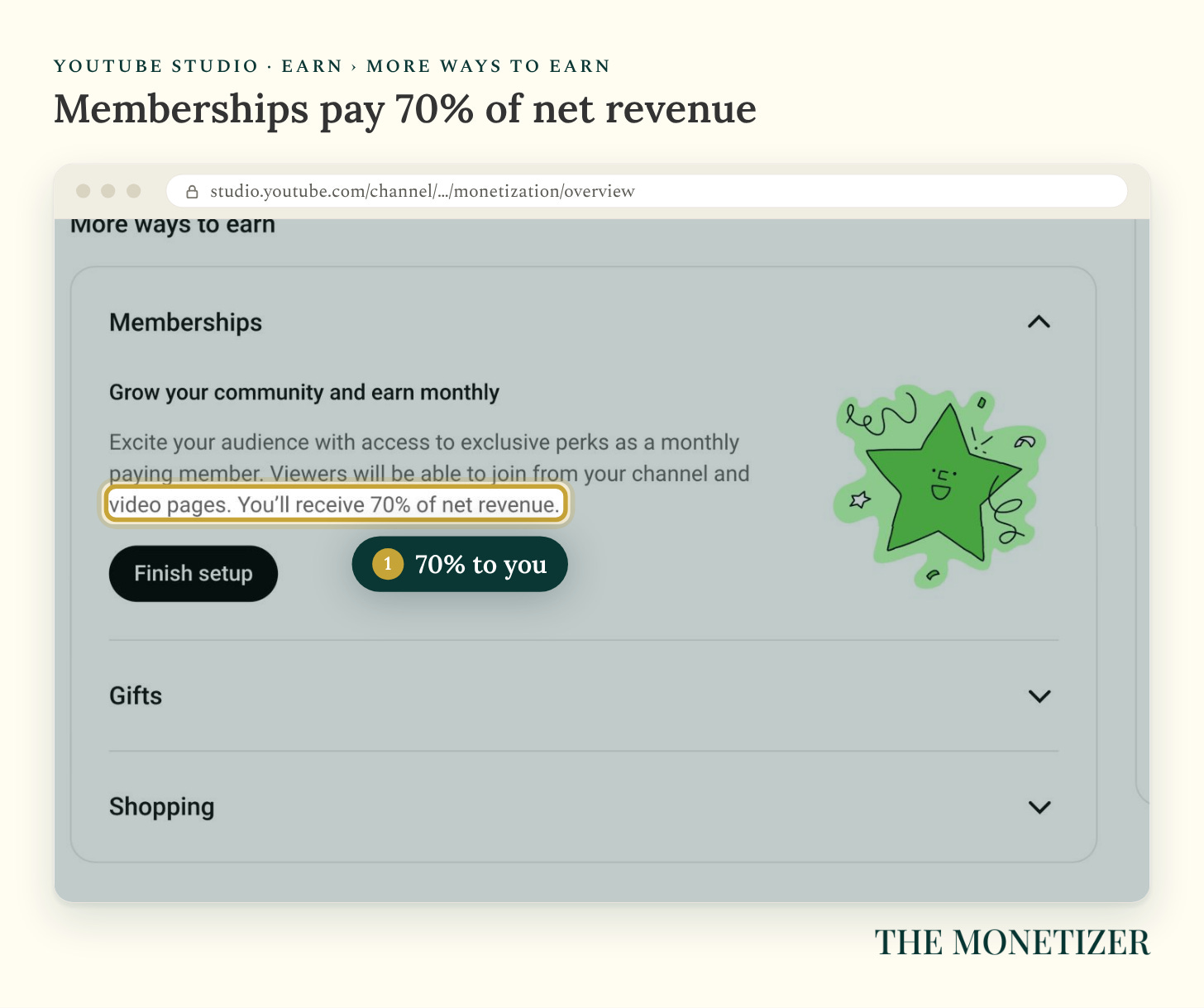
Memberships are one I haven’t finished setting up. They pay you 70% of net revenue, the same share as Supers (YouTube).
When the Money Arrives
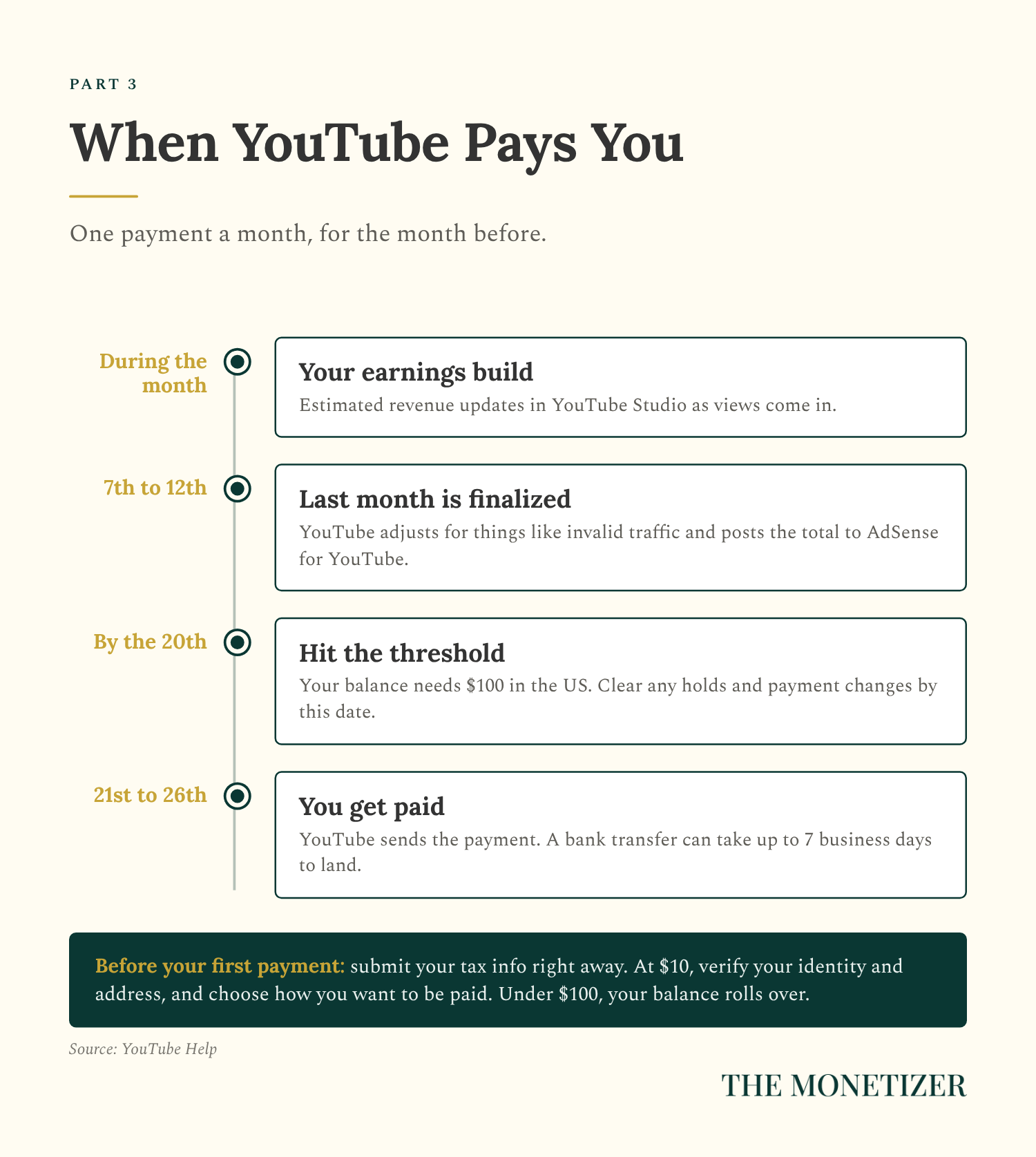
YouTube pays once a month, on this schedule (YouTube):
During the month: your estimated earnings build up in YouTube Studio.
7th to 12th of the next month: YouTube finalizes the month and posts it to AdSense for YouTube.
By the 20th: your balance needs to reach the payment threshold, which is $100 in the US, and any payment changes or holds need to be cleared.
21st to 26th: YouTube sends your payment.
Smaller thresholds come first. Submit your tax info as soon as you join, because that threshold is $0. At $10, YouTube asks you to verify your identity and address and to choose how you want to be paid (YouTube). If you’re under $100 on the 20th, your balance rolls into next month.
Part 4: How to Raise What YouTube Pays You
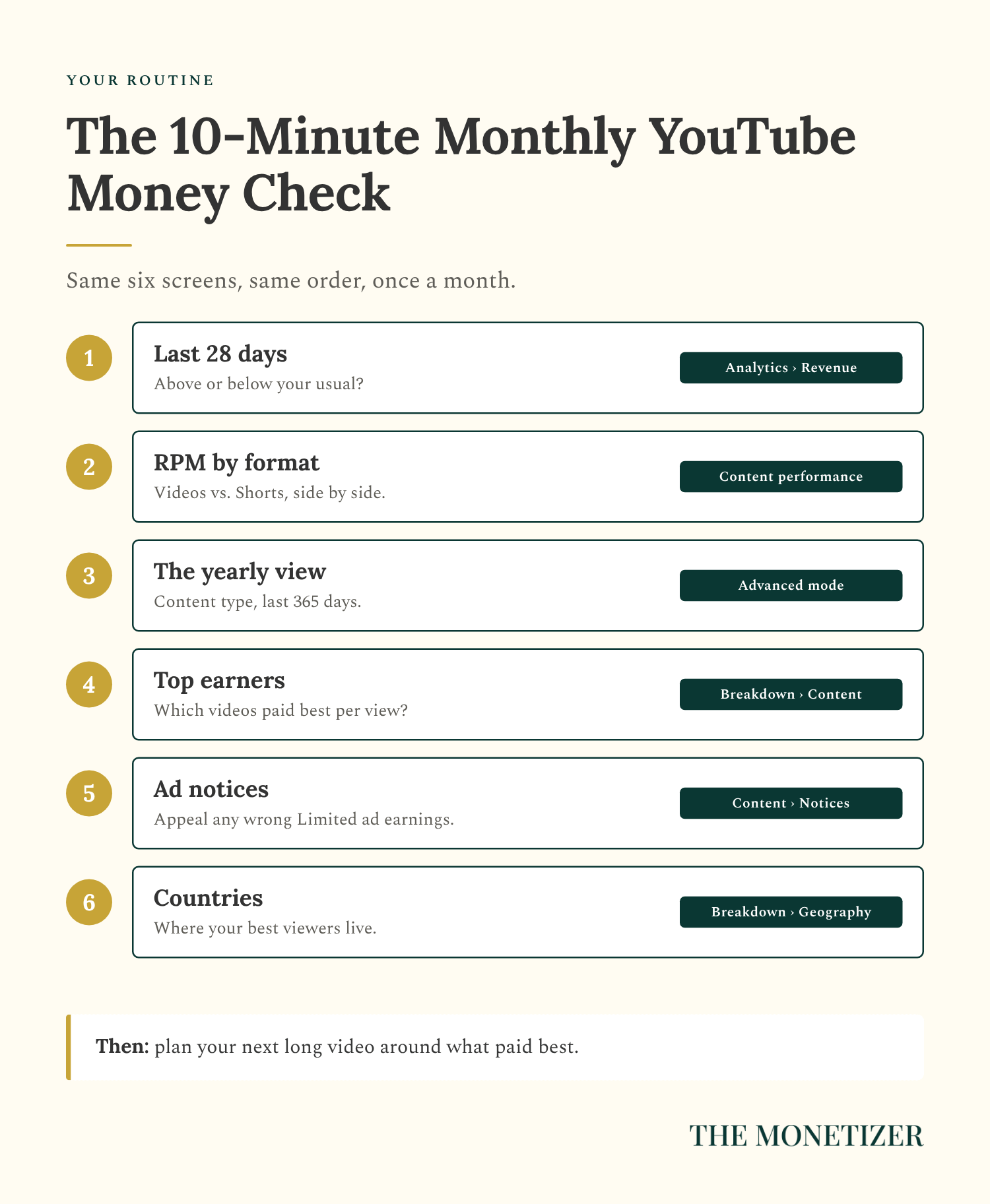
Six moves, in order:
Check your RPM by format every month. Advanced mode, content type, last 365 days.
Make some videos 8 minutes or longer, and keep mid-roll ads on.
Use Shorts to grow and long-form to earn. On my channel, a Short needed about 31 times the views of a long video to earn about the same money.
Watch for Limited ad earnings notices, and appeal the ones that are wrong.
Turn on memberships if you have regulars. You keep 70% of net revenue.
Look at your top countries, and make more of what pulls high-paying viewers.
What a View Is Worth Next to a Subscriber
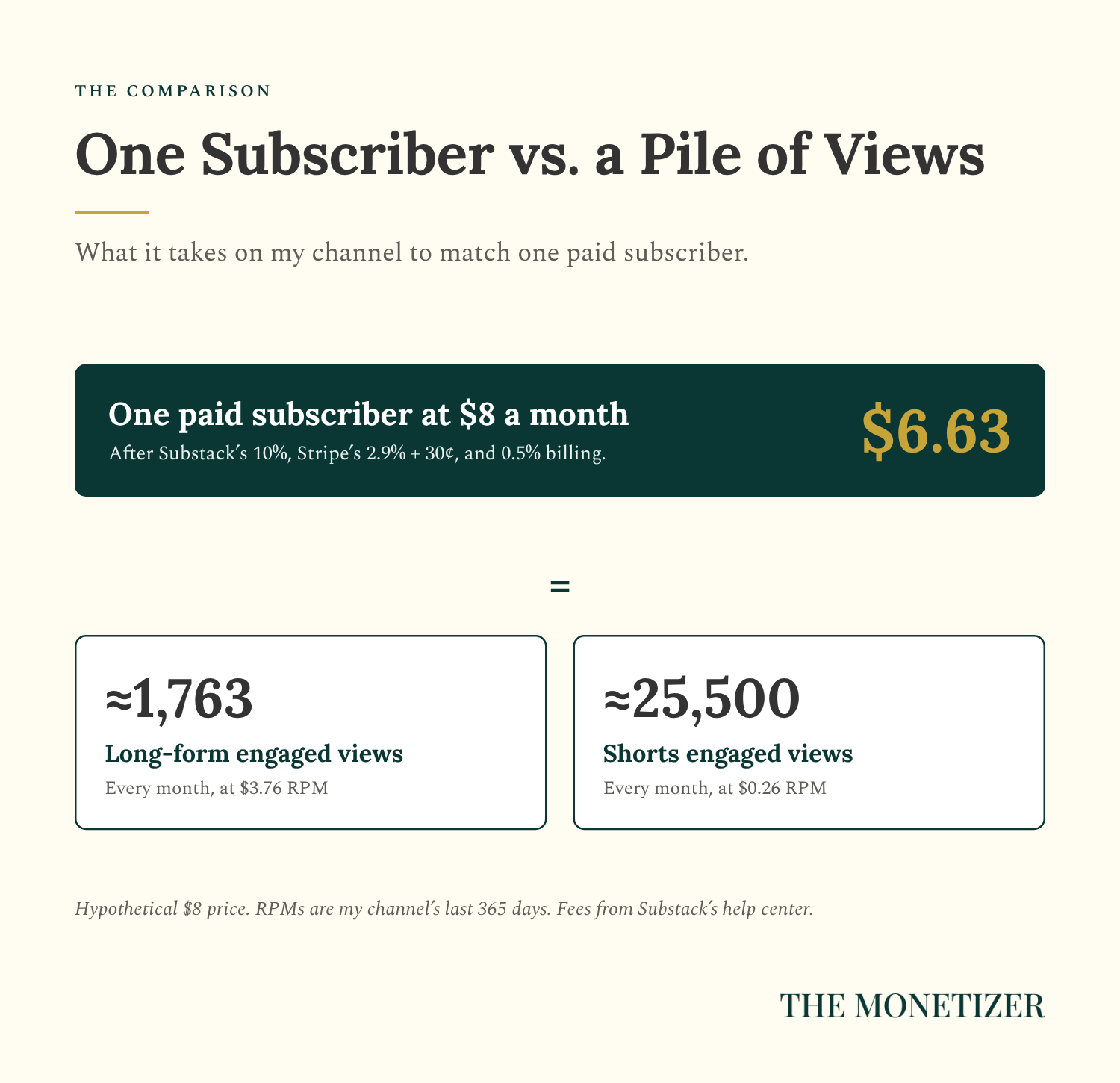
Now put a view next to a paid subscriber. Say you charge $8 a month for a paid newsletter on Substack. Substack takes 10%, and Stripe charges 2.9% plus 30 cents per payment, plus 0.5% for recurring billing (Substack). You keep about $6.63 a month.
At my long-form RPM, matching that one subscriber takes about 1,763 engaged views a month, and at my Shorts RPM it takes about 25,500. Every month, for one subscriber.
Views get you reach. A paid subscriber is revenue you own, and it renews every month.
For me, the gap is wide. My documented Substack system runs at $720K in annual recurring revenue, with 4,700+ paid subscribers, and my Facebook Pages earn more than $20,000 a month. My YouTube channel, with 126,729 subscribers, earned $6,488.83 over the last 12 months. Those are different audiences at different sizes, so it isn’t a clean comparison, but it does show where your time pays best.
FAQ
How Much Does YouTube Pay for 1 Million Views?
On my channel, 1 million engaged views would have paid about $3,760 on long-form videos and about $260 on Shorts, based on the last 365 days. Your number depends on your niche, where your viewers live, your video length, and the time of year.
How Much Does YouTube Pay for 100,000 Views?
At my yearly RPMs, 100,000 engaged views would pay about $376 on long-form videos and about $26 on Shorts.
How Much Do YouTube Shorts Pay?
My Shorts earned $0.26 per 1,000 engaged views over the last 365 days, and $0.35 over the last 28. Shorts earn from a shared ad pool, and creators keep 45% of their slice (YouTube).
Does YouTube Pay You Per Subscriber?
No. Subscribers don’t earn you anything directly. You earn from ads, YouTube Premium, and fan payments like memberships, where you keep 70% of net revenue (YouTube).
When Does YouTube Start Paying You?
After you join the YouTube Partner Program and your balance reaches $100 in the US. YouTube pays between the 21st and 26th of each month for the month before (YouTube).
What Is a Good RPM on YouTube?
There’s no universal number. My entertainment news channel averaged $3.76 on long-form videos and $0.26 on Shorts over the last year. Compare your own RPM by format and month over month, not against a stranger’s screenshot.
Where to Go From Here
YouTube is a great place to get discovered and a hard place to get paid. If you want to turn your audience into revenue you own, that’s what I teach in Substack Best Seller Academy: the documented system behind my $720K in annual recurring revenue, for anyone who wants to build a Substack into a real business.
If you’re comparing platforms, read how my Facebook Pages get paid next.
Paid Subscriber Bonus: The YouTube Money Kit
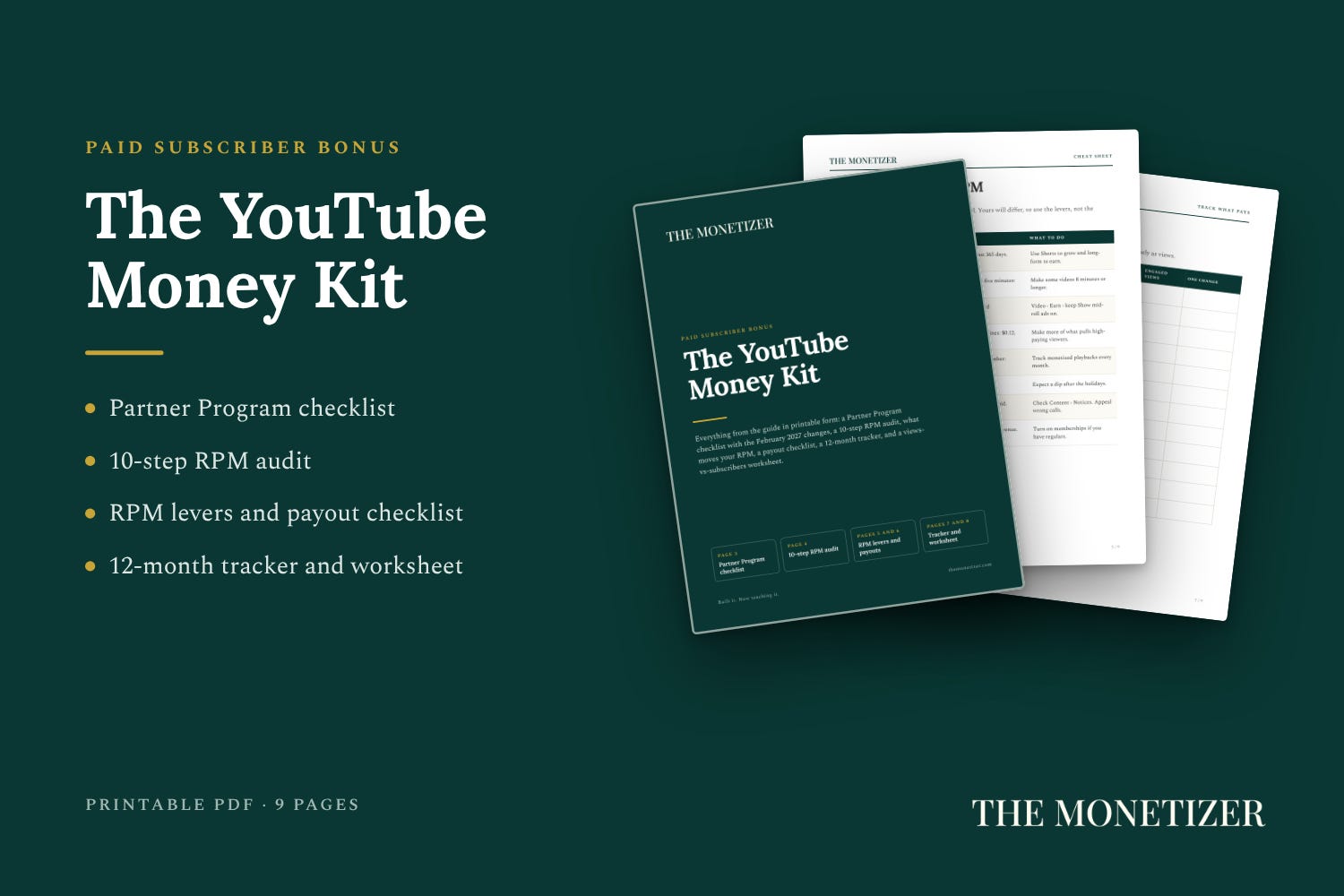
Paid subscribers get the printable kit that goes with this guide:
A YouTube Partner Program checklist, including the February 2027 changes
A 10-step RPM audit to run in YouTube Studio
A payout checklist with YouTube’s monthly deadlines
A 12-month RPM and revenue tracker, plus a views-vs-subscribers worksheet
