


Did you know Meta uses nine “secret” optimizations to find the videos that deserve organic distribution on Facebook?
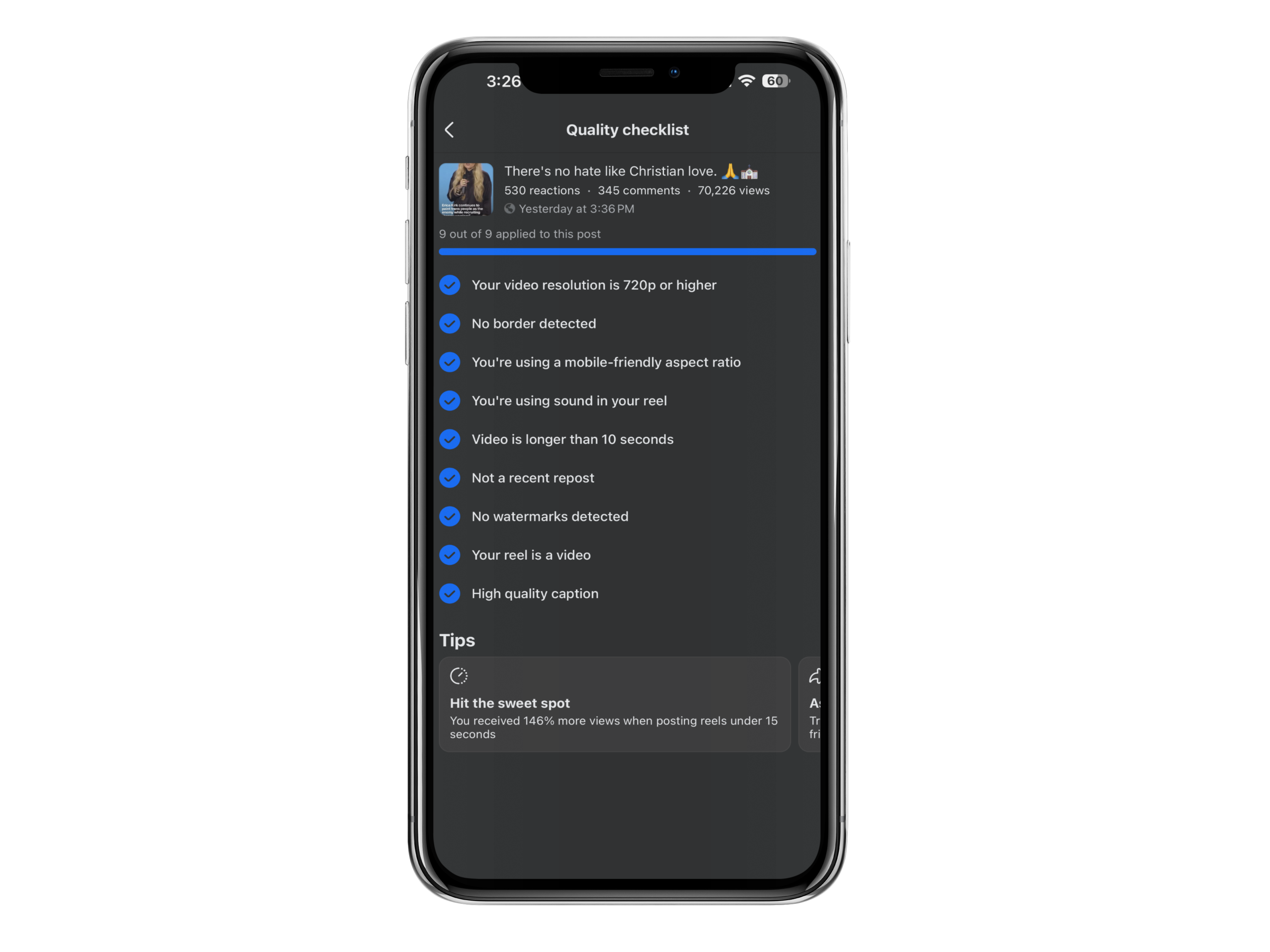
Facebook handed me a nine-point quality checklist after one of my Reels crossed 70,226 views. It passed all nine.
Let me be careful about what that means. Passing every check did not cause those views, and Facebook has never claimed it does. But the checklist tells you something a view count can’t, which is that somewhere in Facebook’s systems there’s a list of technical things it looks at on your video, and now you get to see the list.
The Reel also pulled 530 reactions and 345 comments. Good creative did that. The checklist just kept anything stupid out of the way.
I run a Facebook content business that does more than $20,000 a month. My process is boring. Create, publish, read the data, do more of what worked. This checklist turned up inside that loop.
Why It Pays to Optimize Facebook Reels Before Posting
Nobody’s guaranteed reach. Not me, not you, not the guy with two million followers. But a Reel that flops because the idea was weak teaches you something, and a Reel that flops because you exported a blurry file with a TikTok watermark in the corner teaches you nothing at all.
These nine items are Facebook’s own quality checklist. They’re not published ranking factors, and I’d be lying if I told you what weight any of them carry. Treat them as the floor.
1. Your Video Resolution Is 720p or Higher
Facebook checks that your uploaded video hits at least 720p.
Almost nobody fails this on purpose. You fail it by downloading your own video off another app, editing that copy, exporting it, and doing that twice more over a month. Every round trip squeezes the file. By the third pass your text has gone soft and faces have lost detail, and you won’t notice on a laptop because laptops are forgiving.
Phones aren’t. Open your export and your original side by side on your phone. If the export looks worse, go again at a higher setting.